
Automate your backend with no code — A guide to using server scripts
This article explains how to automatically generate an Employee when a User is created using an ERPNext server script, with implementation examples. It's a lightweight extension that can be used like a Salesforce Apex trigger.
Have you implemented ERPNext, but found it inconvenient to have to register both users and employees twice? This article explains how to automatically generate an Employee when creating a User using a Server Script.
Introduction
ERPNext comes standard with the following 5 customization options:
- Custom fields
- Custom Form
- Client script
- Server script
- App
It can be expanded in stages according to the application, and adjustments can be made to suit the specific needs of the site.
This article focuses on server scripts that allow you to change backend processing in a lightweight and flexible way.
I will explain how to use it in practice.
This time, we will explain how to automatically generate an Employee at the same time as creating a User.
This can be achieved using only ERPNext's standard Server Script functionality and a short piece of Python code, without needing to create an external application.
Furthermore, ERPNext features separation of core and custom components and extension design using official Hooks/APIs,
This allows for "robust customization" that is resilient to updates.
(See separate article for details) Unbreakable customization , Client script Please see below.
So, let's start by experiencing server scripts with a minimal configuration and gradually expand our understanding.
What is a Server Script?
A Server Script is a mechanism for embedding small processes that run on the server side (Python) of ERPNext.
The concept is similar to Salesforce Apex triggers or kintone Webhooks + server functions. You can hook into document events to trigger automated processes and interactions.
Internally, you can access the frappe API (database access, document manipulation, message output, etc.), You can instantly implement "small-scale automation" without having to create a custom app.
While client-side scripts are responsible for UI improvements, Server scripts are responsible for automating business logic and controlling the backend.
for example
-
Document Event Handling
-
When a User is created, an Employee is automatically created as well.
-
Once the sales invoice is confirmed, the inventory will be deducted.
-
Scheduled Batch
-
Send nightly invoice reminders
-
Automatic notification of outstanding tasks
-
API Endpoint
-
Simple webhook that can be called from external services
-
Add a custom REST endpoint
-
Permission control and verification
-
Check your own business rules before saving.
-
Returns an error if the conditions are not met.
etc.
Lightweight extensions are possible that allow you to securely insert processes that don't require separate applications into the ERPNext core.
Implementation Steps
Now, let's actually register the server script.
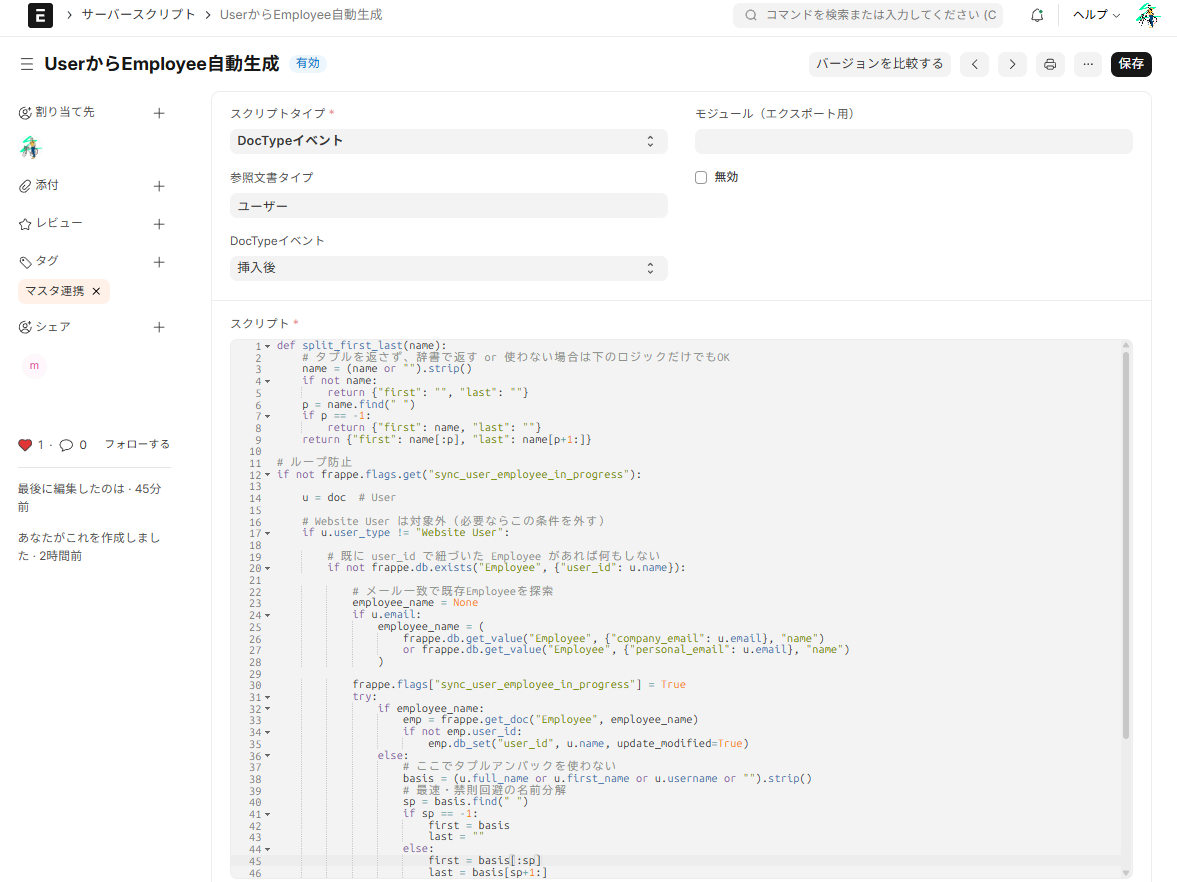
Here, we will implement a minimal configuration where "when a user is created, an employee record is automatically created as well."
procedure
-
Go to Settings → Customize → Server Scripts
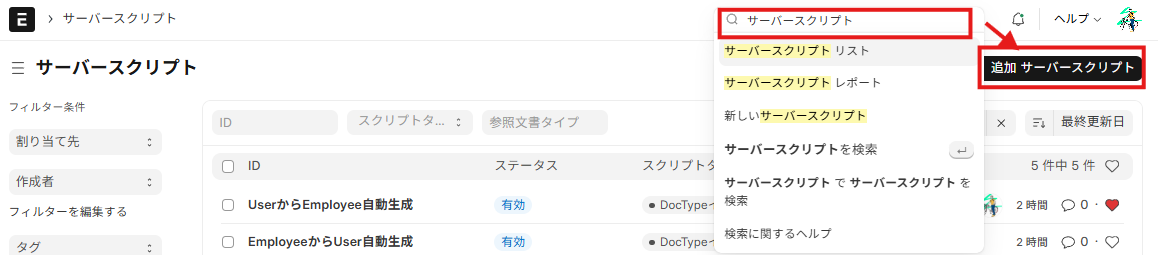
-
Create New → Set the following:
- Doctype:
ユーザ - Script Type:
DocType Event - Event:
挿入後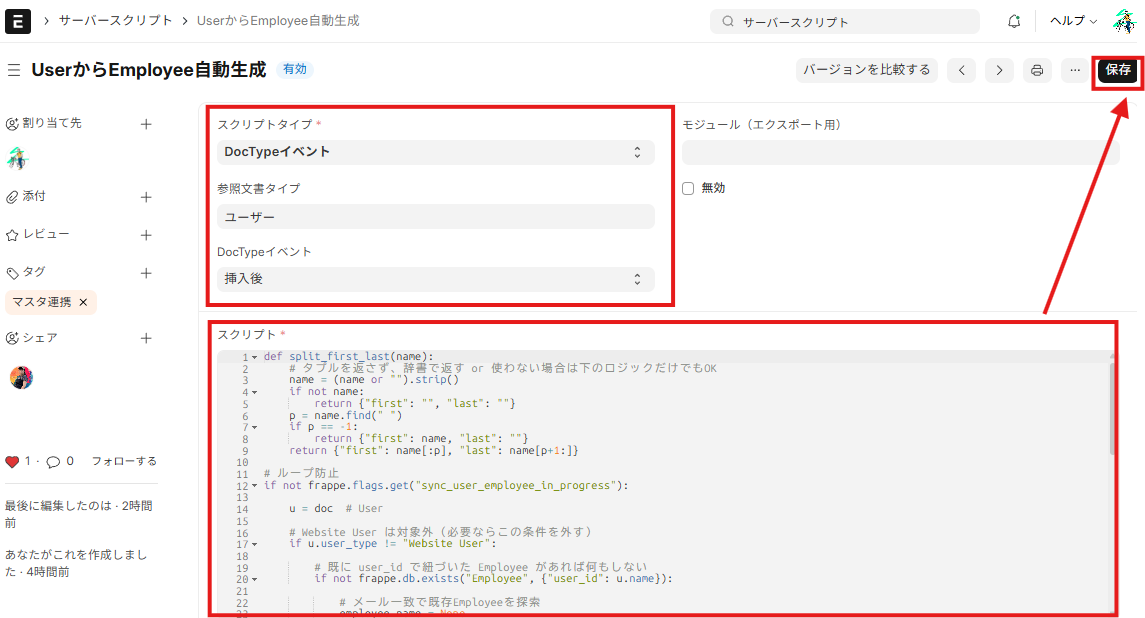
- Paste the code below → Save
# Website User は対象外
def split_first_last(name):
    name = (name or "").strip()
    if not name:
        return {"first": "", "last": ""}
    p = name.find(" ")
    if p == -1:
        return {"first": name, "last": ""}
    return {"first": name[:p], "last": name[p+1:]}

# ループ防止
if not frappe.flags.get("sync_user_employee_in_progress"):

    u = doc  # User

    # Website User は対象外(必要ならこの条件を外す)
    if u.user_type != "Website User":

        # 既に user_id で紐づいた Employee があれば何もしない
        if not frappe.db.exists("Employee", {"user_id": u.name}):

            # メール一致で既存Employeeを探索
            employee_name = None
            if u.email:
                employee_name = (
                    frappe.db.get_value("Employee", {"company_email": u.email}, "name")
                    or frappe.db.get_value("Employee", {"personal_email": u.email}, "name")
                )

            frappe.flags["sync_user_employee_in_progress"] = True
            try:
                if employee_name:
                    emp = frappe.get_doc("Employee", employee_name)
                    if not emp.user_id:
                        emp.db_set("user_id", u.name, update_modified=True)
                else:
                    # ここでタプルアンパックを使わない
                    basis = (u.full_name or u.first_name or u.username or "").strip()
                    # 最速・禁則回避の名前分解
                    sp = basis.find(" ")
                    if sp == -1:
                        first = basis
                        last = ""
                    else:
                        first = basis[:sp]
                        last = basis[sp+1:]

                    emp = frappe.get_doc({
                        "doctype": "Employee",
                        "first_name": first or (u.first_name or u.username),
                        "last_name": last,
                        "status": "Active",
                        "company": "MyHaTch ホールディングス",
                        "date_of_joining": frappe.utils.today(),
                        "user_id": u.name,
                        "personal_email": u.email or None,
                    })
                    emp.insert(ignore_permissions=True)
            finally:
                frappe.flags["sync_user_employee_in_progress"] = False
4. Code Explanation
def split_first_last(name)
if not frappe.flags.get("sync_user_employee_in_progress"):
emp.insert(ignore_permissions=True)
5. Points to note
Server scripts are very useful, but there are a few things to keep in mind.
Here are some common points that people get stuck on.
1. Restrictions imposed by Safe Exec
The server script runs in a safe mode called RestrictedPython. Think of this as a rule that allows you to write code freely, but prohibits dangerous operations.
-import The sentence cannot be used.
(frappe orfrappe.utils (OK)
-getattr /setattr / Double Unpack (a, b = ... ) etc. are disabled
- instead
frappe.flags.get()We use security APIs such as these.
2. Handling doc objects
In event scriptsdoc The variable contains the document to be processed.
However, if you confine it to a function, it may become impossible to reference it.
Top levelif A simple writing style, listing them side by side, is recommended.
3. Errors and Debugging
- If the input is invalid
frappe.throw()This can warn users. - Debugging is
frappe.log_error("内容", "タイトル")This can be recorded in the Error Log. - Since there is no DocType called "Server Script Log" in v15, it will be managed uniformly under Error Log.
5. Impact on Performance
Because the server script is executed "during the save process," heavy processing can slow down the entire screen. For time-consuming processes such as integration with external services, it is appropriate to leave them to background processing.
6. Operational Precautions
Server scripts are stored in a database and are therefore not included in code management tools like Git. Therefore, output to JSON using export-fixtures and include it in the repository, It's important to establish operational rules that allow for tracking.
6. Summary
Server scripts The shortest route to "automating your company's business logic" is.
- Can be used like Salesforce Apex triggers or kintone Webhook functions.
- This system is separate from the ERPNext core and operates based on official Hooks/APIs.
- Therefore, update-resistant and robust expansion is possible.
Furthermore, with the help of AI, anyone can now write these small automation codes in a short amount of time. ERPNext, being open source, is arguably the best "launching pad" for this purpose.
Even workplaces that manage data across multiple systems or using Excel spreadsheets can significantly reduce their workload by centralizing their operations with ERPNext. Moreover, the implementation costs are significantly lower compared to major ERP systems.
We encourage you to utilize ERPNext and server scripts to accelerate the automation of your business processes. Leave the implementation and operation support to us at MyHatch.
Related Articles
Q. Will the server scripts break during the update?
▼
ERPNext server scripts are Separable from the main unit cord Because it is managed in this way, The risk of direct damage from the update is small. However, changes to the Doctype's field structure or API specifications may have an impact.
Therefore, we regularly test updates in a test environment. It is recommended to perform checks to ensure that server scripts are functioning correctly.
Q. What is the difference between server scripts and client scripts?
▼
- Client script It operates in the browser (front-end) and controls form input and UI behavior. Examples: Auto-filling fields, pre-save validation, UI effects.
- Server script It runs on the ERPNext server (backend side), It controls events related to data saving, batch processing, API integration, and more. Example: Automatically generate an Employee when a User is created, and send a reminder every night.
→ The distinction is that client-side scripts are used for changing the UI, while server-side scripts are used for automating business logic.
Q. How much freedom do I have in writing server scripts?
▼
Server scripts RestrictedPython (safe sandbox) Because it operates on top of,
Unlike regular Python, it has limitations.
-import This is generally prohibited (frappe and frappe.utils are permitted).
- Disable dangerous built-ins (getattr/setattr, tuple unpacking, etc.)
- DB access and Doc operations
frappePerformed via API
It is suitable for small-scale automation and testing, but it is recommended to implement complex processes using custom applications.
Related articles
 6 min
6 minComplete control over the input screen — A guide to using client scripts
This guide explains, with practical examples, how to implement form auto-filling, display control, and validation using ERPNext client scripts. Basic JavaScript knowledge is all you need to get started.
 6 min
6 minFull-scale expansion is done with custom apps — the basics of ERPNext expansion development
This guide explains how to implement complex logic that cannot be handled by server scripts as an application. You will learn how to proceed with secure extension development separate from the ERPNext core.
 8 min
8 minIt won't break even after updates — the strength of ERPNext's expandability design
ERPNext minimizes the risk of corruption during version upgrades through its "separation of core and custom parts" and "extension via official hooks/APIs." This article explains why you can customize it with peace of mind.