
It won't break even after updates — the strength of ERPNext's expandability design
ERPNext minimizes the risk of corruption during version upgrades through its "separation of core and custom parts" and "extension via official hooks/APIs." This article explains why you can customize it with peace of mind.
Introduction
The content of this article was verified in the following environment. Please note that the behavior may differ depending on the environment.
• ERPNext: v15.75.1 (version-15)
• Frappe Framework: v15.77.0 (version-15)
• Bench: v5.x
• Database: MariaDB 10.x
• OS: Ubuntu 22.04 LTS (64bit)
For engineers implementing ERP systems, one of the biggest concerns is "Adding customizations will prevent future version upgrades." ERPNext solves this problem from the design level using two mechanisms: Hook and OverWride.
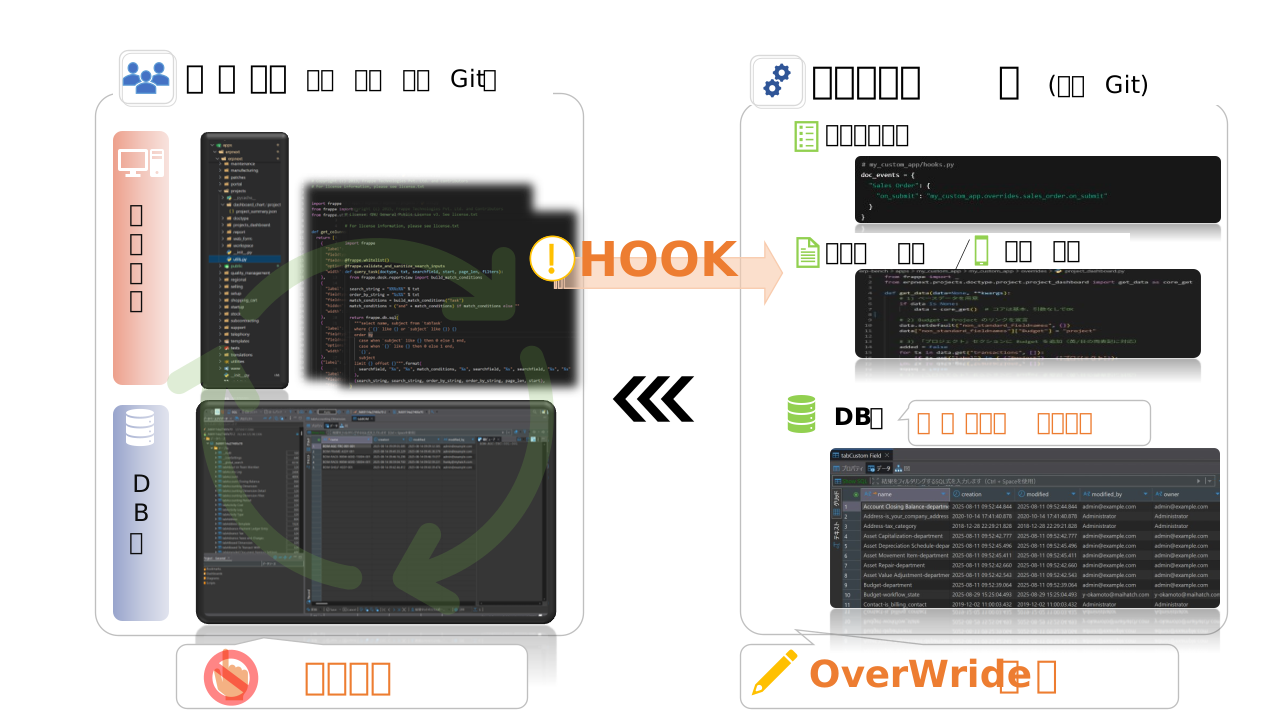
- HOOK = A mechanism that allows you to insert custom processing at the execution timing of standard function code!
- sauce = Do not touch the standard source code! Place custom source code in a separate file!
- Override = Replace only the necessary standard functions and execute custom processes!
1. ERPNext's Design Philosophy for Withstanding Version Upgrades
ERPNext's "unbreakable customization" is supported by the following five mechanisms: These are all aspects that I've noticed are actually effective when I'm providing implementation support.
① Separation of responsibilities
ERPNext comes standard with a system that clearly separates and manages the "main unit" and "customizations."
A dedicated area for adding customizations is provided from the start, and apps and fields placed there function as naturally as if they were part of the standard functionality. Moreover, since this area is independent of the core, there is no need to rewrite the main code at all.
Furthermore, the Hook mechanism officially defines "which events trigger processing" and "which functions override," making it more than just a simple add-on; it allows for the safe overriding of existing processes.
Thanks to this design philosophy, you can easily customize the device while keeping it up-to-date.
② Improvements to the DB schema
ERPNext does not directly add physical columns to the core DB tables. Instead, custom fields are stored as "meta information" in a dedicated table called tabCustom Field.
This mechanism ensures that even if new columns or constraints are added during core-side migration, Custom fields will not conflict, and the design is such that errors are less likely to occur after an update.
In other ERP systems, it's commonplace for updates to break things because the database was directly modified,
ERPNext structurally avoids that risk. That's quite reassuring, isn't it?
Isn't that amazing???
③ Hook mechanism
When customizing, there is no need to modify the core source code. hooks.py This overrides events and methods.
This is very safe because it uses an officially provided API.
In other words, customization is guaranteed through "legitimate channels" rather than "tricks," and it will not compromise future compatibility.
④ Standardization of Export/Import
bench export-fixtures The above custom fields and additional database tables can be converted to JSON.
It's easy to integrate into CI/CD and reduces the differences between the test environment and production.
Based on experience, the confusion caused by "not knowing the differences between the production and development versions" is a common pitfall in ERP implementation, but ERPNext has a built-in mechanism to prevent this.
⑤ Version control using Git
ERPNext and custom configurations are managed in separate Git repositories.
The collision will occur Only within my own app is.
In other words, there's no need to worry about "updates causing chaotic conflicts between the main program and your custom code," and as long as you understand the Git flow, you can work with peace of mind even in team development.
ERPNext.JP's Track Record — Continuously incorporates system version updates.
The design philosophy described above is not just theoretical. ERPNext.JP actually maintains its customizations while repeatedly incorporating updates to the core system.
ERPNext itself is under very active development, with minor patch releases every month and major version upgrades approximately every 1 to 1.5 years (v14: August 2022 → v15: September 2023 → v16: January 2026).
ERPNext.JP update history
- We continuously review and implement minor updates released every month.
- Major version upgrades from v14 to v15 to v16 were also completed while maintaining customizations.
- None of the updates have resulted in any instances of custom apps or personal settings being corrupted.
This is proof that the aforementioned "separation of the main unit and custom parts" design is functioning well at a practical operational level.
2. The Four Layers of Customization
From here, we will explain the specific customization methods.
Customization can be divided into four stages.
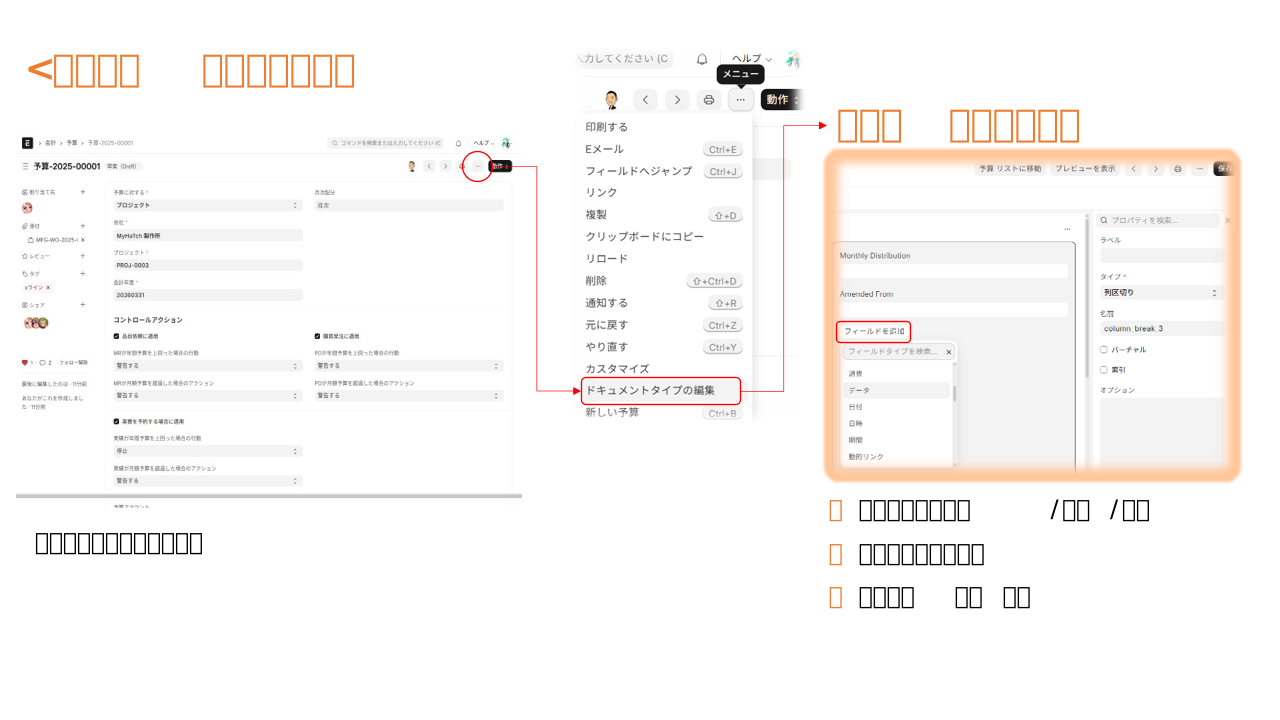
1. Custom Fields
ERPNext makes it easy to add custom fields from the administration screen.
You can freely configure text input fields, display formats, dropdown lists, checkboxes, and more using only your mouse.
The database containstabCustom Field This system automatically registers the changes and avoids directly modifying the core tables, thus preventing conflicts during updates.
The operation is intuitive and easy.
2. Client Script
On-screen events can be hooked using a Custom Script. For example, you can easily implement actions such as "automatically displaying the stock quantity when a product is selected on the order form."
// client_script.js
frappe.ui.form.on("Sales Order Item", {
  item_code(frm, cdt, cdn) {
    frappe.call({
      method: "my_custom_app.api.get_stock_balance",
      args: { item_code: locals[cdt][cdn].item_code },
      callback: r => frappe.msgprint(`在庫数: ${r.message}`)
    });
  }
});From a practical standpoint, this can be described as a layer that allows you to quickly incorporate "minor automation" in a way that's close to no-code.
Key points for utilizing AI
Currently, ChatGPT has "Sales Order Item" item_code Simply telling them to "write a client script that displays the inventory count when it changes" is enough. It will instantly provide you with a template code. .
Many of them are ready to use right out of the box, requiring only minor adjustments to fit our company's rules. Since ERPNext is open source, its API, DocType, event names, and implementation examples are publicly available. A key strength is that AI can easily suggest "correct code" based on internal specifications. This is an advantage that closed ERP systems cannot replicate.
3. Custom Forms and Print Formats
Forms and print layouts are saved in JSON format, making it easy to export and import them from the development environment to the production environment. In particular, the format of invoices and quotations is important in Japanese business operations. ERPNext allows for free addition and editing. It can flexibly accommodate requests such as "We want to match the customer's specified report format" on-site.
4. Custom App
If further expansion is required, bench new-app my_custom_app Create a standalone app
This method allows you to "replace" the processing on the additional application side without making any changes to the ERPNext core, thus almost certainly avoiding problems during version upgrades.
For example, if you want to replace the standard method for creating a delivery note from an order, you would write an override declaration in hooks.py as shown below, and write the add-on functionality in overrides.make_delivery_note.
# hooks.py
override_whitelisted_methods = {
  "erpnext.selling.doctype.sales_order.sales_order.make_delivery_note":
    "my_custom_app.overrides.make_delivery_note"
}
# my_custom_app/overrides.py
import frappe
from erpnext.selling.doctype.sales_order.sales_order import make_delivery_note as erpnext_make_delivery_note
def make_delivery_note(source_name, target_doc=None):
"""
カスタムメッセージをログに出力
"""
# --- 標準の処理を呼び出し ---
delivery_note = erpnext_make_delivery_note(source_name, target_doc)
# --- カスタム処理を追加 ---
# 独自フィールドに値をコピー
sales_order = frappe.get_doc("Sales Order", source_name)
if hasattr(delivery_note, "custom_sales_person"):
delivery_note.custom_sales_person = sales_order.sales_person
# カスタムメッセージをログに出力
frappe.logger().info(f"Custom override: Delivery Note created from Sales Order {source_name}")
return delivery_noteUnderstanding this mechanism makes the design philosophy of "not touching the main unit and separating responsibilities with additional apps" perfectly clear. As a result, the system becomes more resilient to version upgrades, and roles and responsibilities become clearer in team development.
Overall, customizing ERPNext is
- Minor adjustments are made using custom fields.
"On-site support is handled through forms, documents, and scripts."
• Full-fledged extensions can be done with custom apps or server-side scripts.
It is organized into these three stages, making it a very user-friendly design in practical terms.
Hook points provided as standard
ERPNext (more precisely, the Frappe Framework) comes standard with many hooks for extension. When we organize the most representative examples by category, they are as follows:
🔹 Event Hook
-doc_events
Insert processing when a DocType is created, updated, or deleted.
example:validate ,before_save ,on_submit
🔹 Method Hooks
-override_whitelisted_methods
Replace existing API endpoints with custom functions.
🔹 UI / Frontend
-fixtures
Custom fields and print formats can be converted to JSON and distributed.
-app_include_js /app_include_css
Load your own JS/CSS
🔹 Scheduled Jobs
-scheduler_events
You can register scheduled processes to run at regular intervals (hourly, daily, Cron, etc.).
3. Customization Examples
-
Industry-specific customization Those "minor additional items" that inevitably arise in each project can be resolved with Custom Fields in ERPNext.
-
For agricultural corporations, simply adding a field to input "harvest yield" will allow the data to be immediately reflected in reports and summaries.
-
In the real estate industry, creating a field for "contract renewal date" can prevent omissions and errors in renewal management. Both require only a few clicks, making them excellent examples of "adapting a system to the specific needs of the workplace without disrupting it."
-
Output Customization It is a well-known fact that Japanese companies have strict requirements for invoice and quotation formats. With ERPNext, you simply incorporate company-specific elements such as "sales tax details" and "customer codes" into the print format. Being able to gain acceptance from the field without requiring development is a major advantage when moving forward with implementation.
-
Custom Workflow There are many situations where you might want to add an approval route. For example, a rule like "Orders over 1 million yen require executive approval." ERPNext allows you to integrate workflows and server scripts to implement changes in the system without disrupting existing practices. This is where the true value of ERPNext lies: "adapting the system to business processes."
-
Example of what NOT to do I'll also share some common mistakes we see in implementation sites.
-
Core
.pyEditing it directly → This seems quick at first glance, but it will inevitably be deleted in updates. -
Structural changes to DocType → While convenient in the short term, there is a high risk of breaking compatibility in the future.
-
Forgetting to create a fixture → This is a classic example of a situation where something works in the development environment but doesn't translate to production, leading to the question "why?". These are all pitfalls that experienced engineers would unanimously agree should be avoided at all costs.
summary
ERPNext fundamentally breaks the curse common to traditional ERP systems: "customization equals no updates."
The core remains up-to-date at all times, while custom add-ons and business-specific settings can be retained.
This architecture is a major source of reassurance.
In fact, ERPNext.JP has a proven track record of seamlessly integrating everything from monthly minor updates to annual major version upgrades while maintaining customizations.
For engineers working on-site, this is one of the few systems that can simultaneously achieve both proactive customization and defensive operation. The ability to respond to short-term on-site needs while simultaneously proceeding with future version upgrades without fear—this flexibility is rarely seen in other ERP systems.
In other words, ERPNext is not simply an "inexpensive ERP," but is strongly positioned as an option that can support the long-term growth of the system.
Related articles
 7 min
7 minAdd fields without coding — customize fields to fit your business.
This guide shows you how to add new input fields to the ERPNext screen without coding. You'll learn how to use various field types such as text, date, select, and link.
 6 min
6 minComplete control over the input screen — A guide to using client scripts
This guide explains, with practical examples, how to implement form auto-filling, display control, and validation using ERPNext client scripts. Basic JavaScript knowledge is all you need to get started.
![[Case Study 1] Workflow Approval Status Display](/images/documents/custom/workflow-panel/workflow-panel-hero-new.png) 8 min
8 min[Case Study 1] Workflow Approval Status Display
This example demonstrates how to extend workflow approval status into a custom application.