
Centralized management of size and color variations — How to use the item variant function
How to manage variations in size, color, and specifications of the same product using ERPNext? This guide explains the setup procedure and operational tips for the variant function, complete with screenshots.
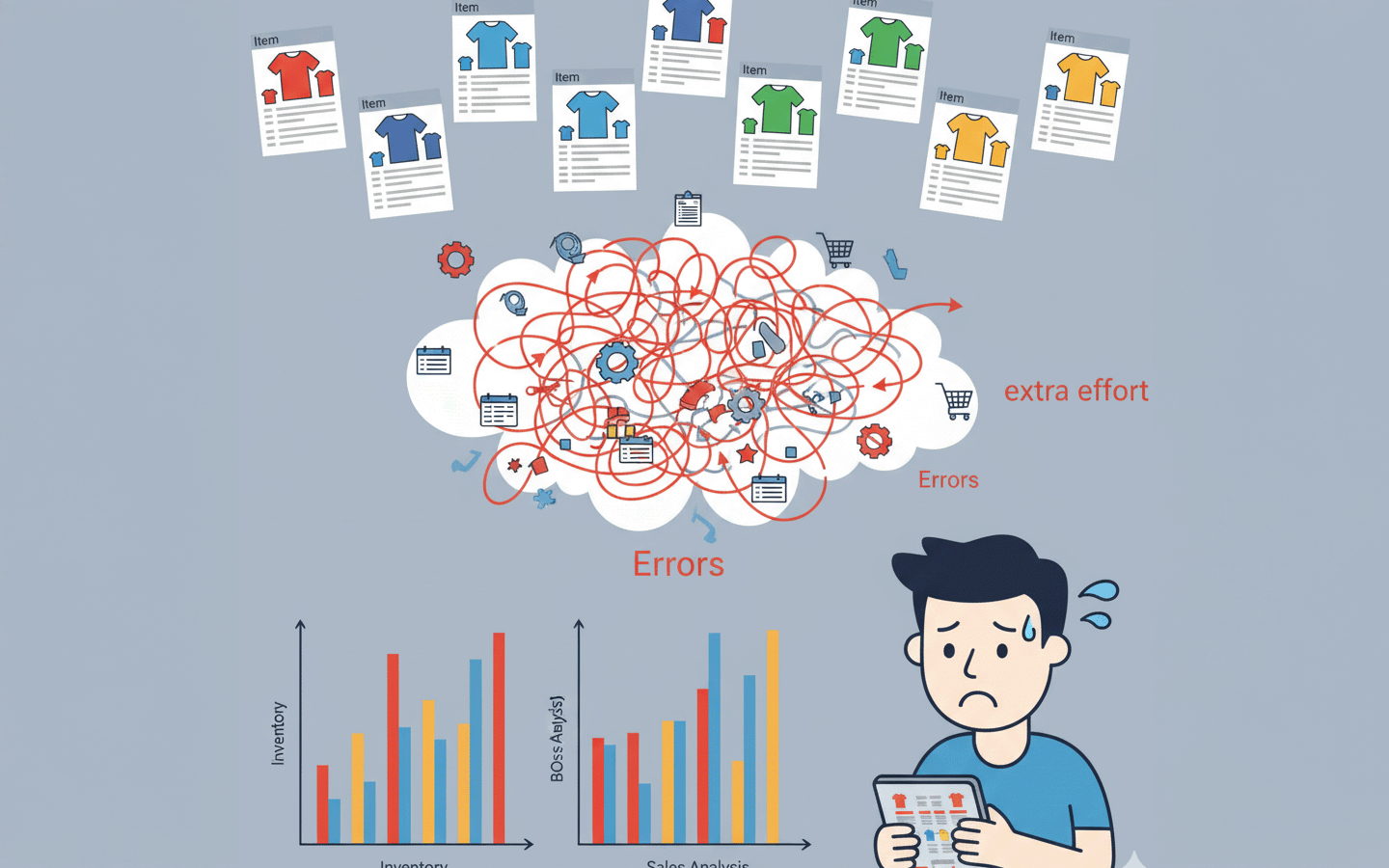
Are you managing products with different sizes and colors individually using Excel? With ERPNext, you can use the "Item Variant" function to efficiently manage only the differences while consolidating common parts into one.
1. Introduction — What happens if your ERP system lacks "variant management"?
How do you manage products that come in different sizes and colors?
Many ERP systems have weak or nonexistent "variant management" capabilities. Therefore, on-site, different sizes and colors are registered as separate items. Every time we perform inventory and sales analysis, or revise the Bill of Materials (BOM), it creates extra work and errors.
ERPNext.JP comes standard with an "item variant function" that allows you to consolidate common parts while efficiently managing only the differences. It reduces cumbersome registration and modification work, allowing you to simplify the operation of all aspects of inventory, sales, and manufacturing.
In this article,
- Problems that arise in the field when variant functionality is not available
- ERPNext.JP's variant management mechanism
- How to actually write a master (BOM, etc.) and its specific benefits
We will explain this in an easy-to-understand way.
2. What problems arise from the lack of variant functionality?
Without variants, ERP systems will result in inefficiencies and errors at every stage of the operation. Here, we'll look at four typical problems, using specific examples from different industries.
2-1. Inefficiencies in BOM management
I have to register the same part multiple times. Making corrections and updates is a lot of work.
- Manufacturing (furniture):
Even with the same table, re-registering the BOM due to a "different color of the tabletop" → ✖ Correction omissions occurred. - Metal processing:
Registering items with different dimensions as separate items → ✖ Requires correcting dozens of entries one by one when changing parts. - Food Manufacturer:
Create a Bill of Materials (BOM) for each different package size (1kg bag, 5kg bag) → ✖ Failure to reflect raw material revisions.
2-2. Difficulty in seeing inventory
Even if you know the individual inventory levels, you can't immediately grasp the overall picture. This can lead to stock shortages or excess inventory.
- Apparel:
The inventory report is divided into "T-shirts S," "M," and "L," making it impossible to immediately determine the total number of shirts. - Food Manufacturer:
Managing different sizes (1kg cans, 5kg cans, 20kg cans) as separate items → ✖ Overlooking stock shortages in the warehouse - Electronic components:
Resistors are managed separately according to their specifications → ✖ It's difficult to see "how many thousands of resistors there are in total," leading to procurement delays.
2-3. Difficulties in sales and analysis
We are unable to accurately grasp sales and demand trends. This will affect our sales strategy.
- Retail (E-commerce shop):
We have to create a separate product page for each size, which makes sales spread thin and difficult to analyze. - cosmetics:
Different capacities within the same series → ✖ It's impossible to track "how many units were sold in the entire series." - Beverage Manufacturer:
Treating each label design as a separate item → ✖ Unable to accurately measure promotional effectiveness
2-4. On-site operational errors
The number of items has become so vast that errors occur during input and selection. This will increase the burden on those on site.
- Automotive Parts:
Managing different colors as separate items → ✖ Mistakenly shipping the wrong color during shipment - Building materials (construction company):
Multiple product codes due to different thicknesses → Frequent errors in entering quotes - Medical consumables (gloves):
Detailed item registration by size → ✖ Frequent incorrect restock orders
👉 Regardless of the industry, the inefficiency of "duplicate registration despite many common elements" inevitably occurs. ERPNext.JP's "Item Variant" feature can fundamentally resolve these issues.
3. ERPNext.JP's Variant Management Mechanism
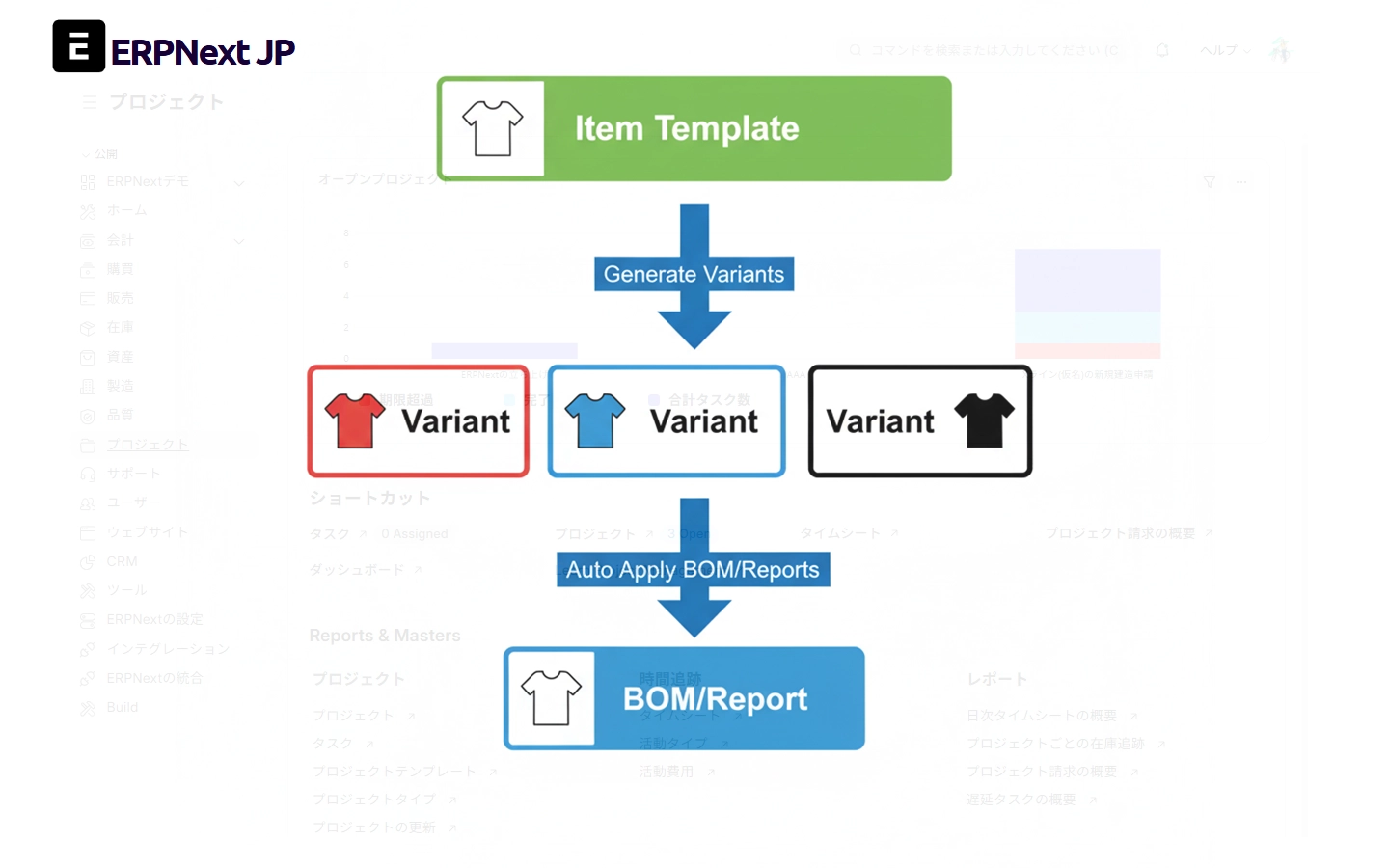
In ERPNext.JP, items are managed by dividing them into "templates" and "variants." This system allows you to configure common elements only once, and add only the differences.
3-1. Item Templates
- It centrally manages information common to all variations, such as product name, main components, and accounting classifications.
- For example, if you use "T-shirt" as a template, you only need to register the sales price and accounting rules here once.
👉 Benefits
- Streamlining BOM management:
Changes to raw materials are reflected in all sizes and colors simply by modifying the template's BOM (Bill of Materials). This eliminates the possibility of missing changes. - Ease of viewing inventory:
Since inventory can be displayed at the template level or at the size/color variant level, you can check both "the total number of items" and "the number of items in stock for each size."
3-2. Variants
- Derived items with differences in size, color, material, etc. are created as "variants" based on the template.
- Variants can be created not only manually, but also automatically by combining attributes. Example: Color (red/blue/white) × Size (S/M/L) → Generate 9 different variants at once.
👉 Benefits
- Ease of use in on-site operations: On sales and order screens, variants can be selected from templates via a dropdown menu, preventing confusion and incorrect selections during data entry.
- Ease of Sales Analysis: You can easily switch between viewing "Total T-shirt Sales" and "Sales of Red M Only," allowing you to accurately grasp demand trends.
- Improved inventory accuracy: Because inventory levels for each variant can be managed correctly, situations such as "only size L is out of stock" can be addressed immediately.
3-3. The overall effect of the system
ERPNext.JP's variant management goes beyond simply streamlining inventory management.
- Eliminates missed BOM corrections → Allows for immediate response to design changes and raw material revisions.
- Inventory visibility improves → Both the overall picture and details can be grasped.
- Can be used in sales strategies → Allows for analysis of popularity trends by color and size.
- Reduces the workload on the factory floor → Prevents a proliferation of items and reduces errors in data entry and shipping.
👉 In short, variant management is a system that works in all aspects of "manufacturing," "sales," "inventory," and "accounting." With ERPNext.JP, you can use this mechanism as a standard feature.
4. Actual Master Data Registration
From here, we will introduce the actual variant registration procedure in ERPNext.JP. Once you've created a template, it will be automatically reflected in the variants, significantly reducing the effort required for registration and maintenance.
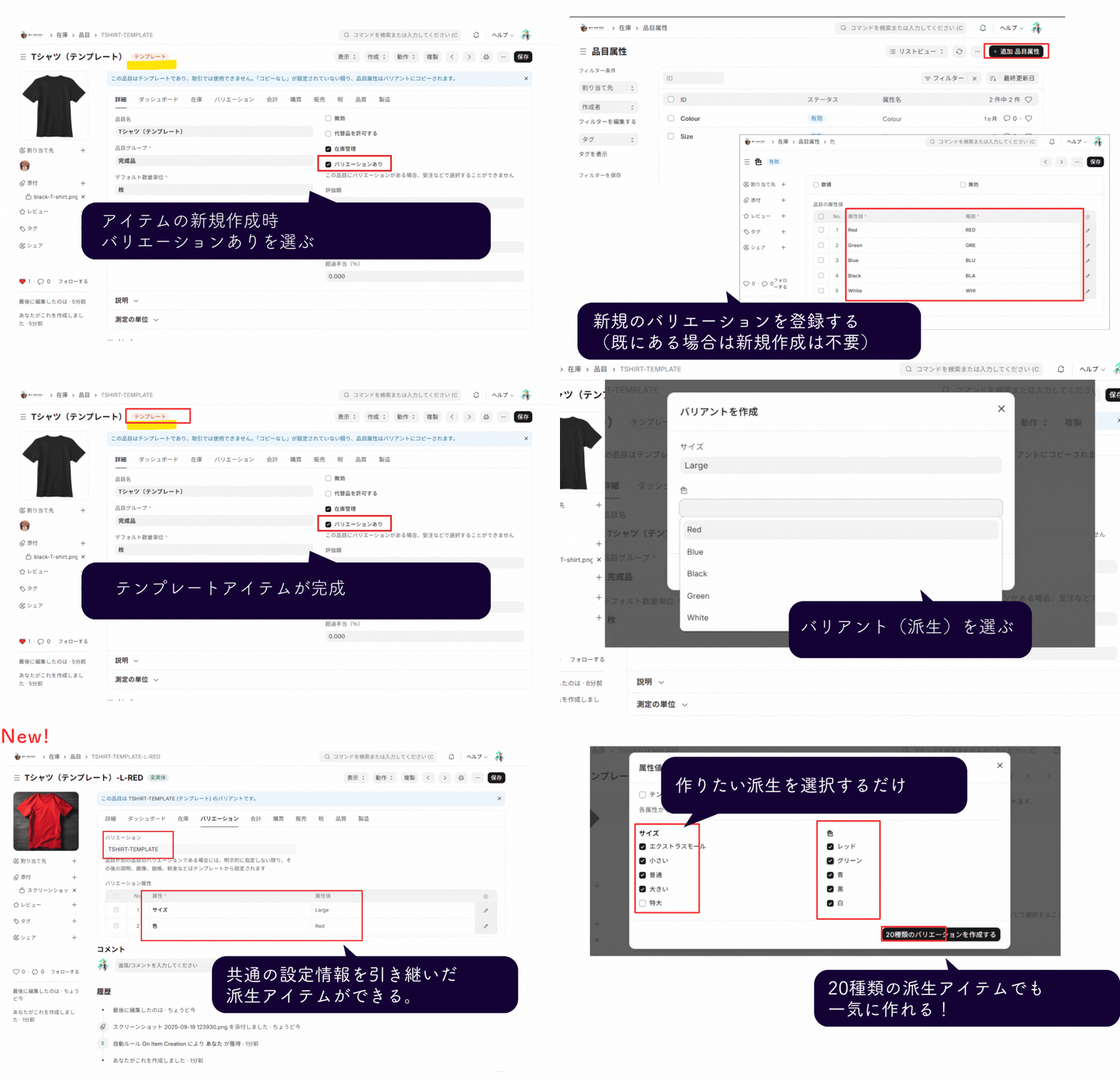
4-1. Create a template BOM
First, we create a common BOM for the "item template".
- For example, create a "T-shirt" template and register materials common to all sizes and colors such as "fabric" and "thread" as components.
- If there are parts that differ depending on the size or color, you can register them as "attribute-dependent parts" by specifying the conditions. Examples: Using more fabric for size L only, using a different dye for certain colors, etc.
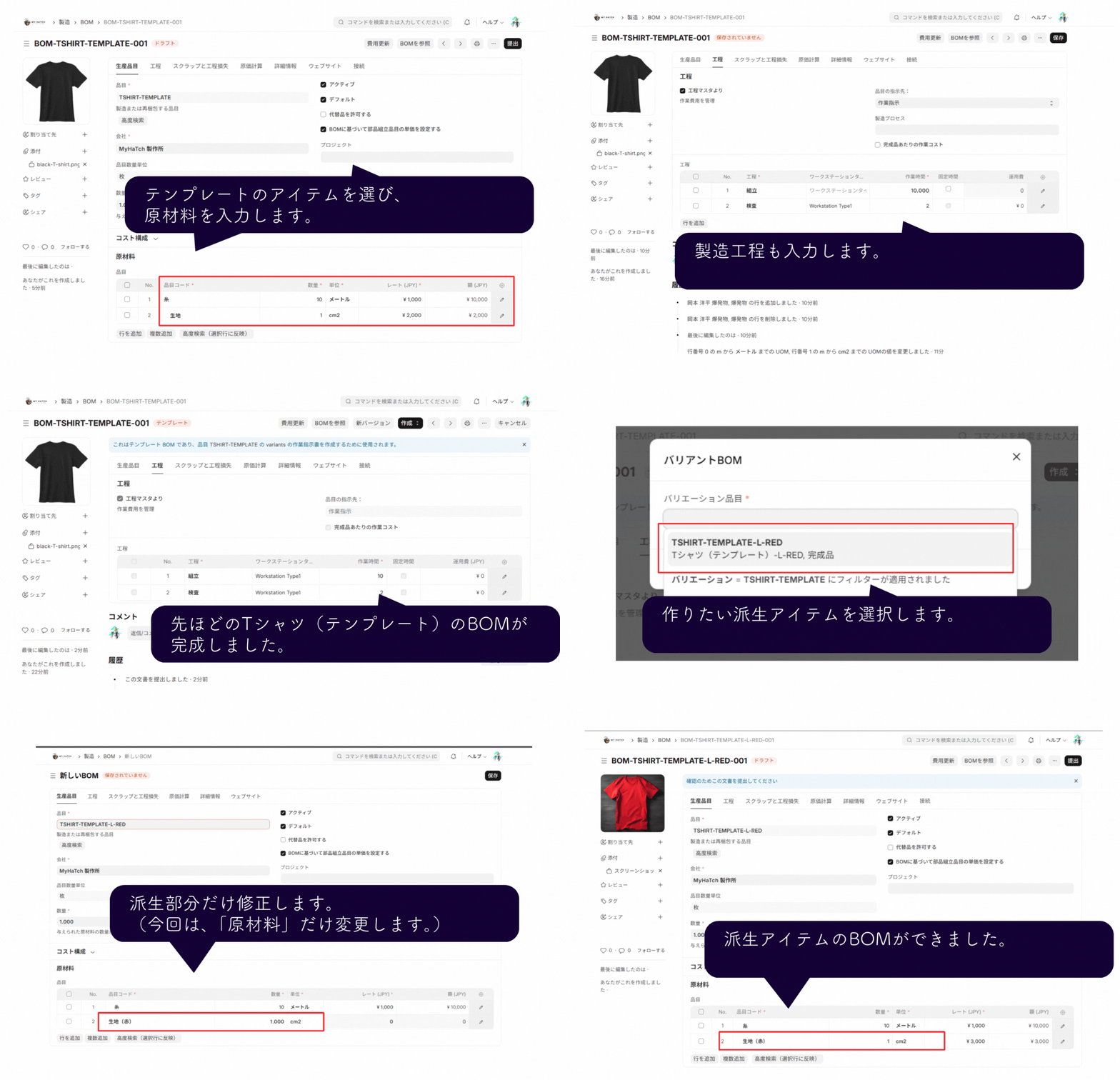 This is the registration screen for the template BOM. Common components and components that differ for each variant can be registered separately.
👉 Key points here
- Common parts only need to be registered once.
- By using attribute-dependent components, exception patterns can also be managed centrally.
4-2. Automatically reflected in variants
The BOM set in the template will be automatically applied to all variants you create.
- Even if you have multiple variations such as "Red S," "Red M," and "Blue L," you don't need to create a BOM for each one.
- Changes or additions to components will be reflected in all variants at once simply by modifying the template.
Screenshot showing the BOM automatically updated for all variants after template modification.
👉 Key points here
- Can quickly respond to design changes and raw material cost revisions.
- Prevents missed corrections and duplicate entries.
- Even if there are dozens of variants, management is done solely through the template BOM.
4-3. Business Benefits
Thanks to this system, the following effects can be seen on-site:
- Manufacturing Site: BOM corrections can be completed in one go, drastically reducing rework and errors.
- Purchasing & Inventory: The amount of common parts used can be instantly determined regardless of size or color, improving ordering accuracy.
- Management and Analysis: Changes in parts costs are automatically reflected, resulting in more accurate profit calculations.
👉 ERPNext.JP's variant management not only streamlines master data registration, but also directly contributes to accuracy and speed in the field.
4-4. Procedure for automatically generating variants
ERPNext.JP allows you to automatically generate variants by specifying combinations of size, color, and other elements. There is no need to register each item manually.
Procedure Flow
-
Open the item template Select a template such as "T-shirt".
-
Set the attributes Example: Color (Red / Blue / White), Size (S / M / L)
-
Automatically generate combinations You can create 9 different variants at once by multiplying color by size.
-
Automatically updated in inventory and BOM Each generated variant will inherit the template's BOM, accounting settings, and other configurations.
By specifying attributes, you can generate all possible variant combinations at once.
👉 This system allows you to register dozens to hundreds of product variations in a short amount of time. Subsequent inventory management and BOM management will also be streamlined.
5. Actual Screen Examples — Inventory Report and Sales Orders
How can the mechanisms and master data registration we've looked at so far be utilized in actual screens? ERPNext.JP makes it easy to handle variants in inventory and sales scenarios.
5-1. Inventory Report
- In addition to displaying a list of inventory levels for each variant, it is also possible to aggregate the total inventory on a template basis.
- For example, you can check the inventory of a "T-shirt (template)" at a glance, and also quickly track details such as "red M" and "blue L".
- Warehouse staff can see on the same screen which sizes are likely to run out and how many are left in total.
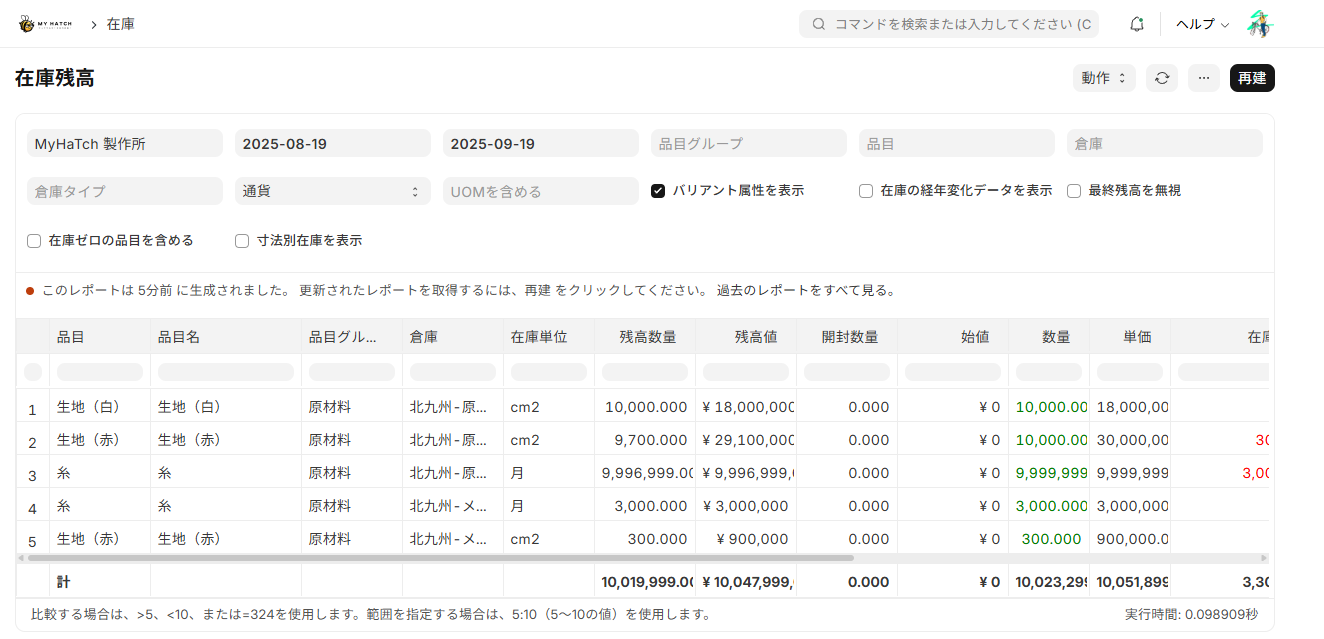 Inventory report screen. Inventory levels can be viewed using both templates and variants.
5-2. Sales Order Screen
- When creating quotes or sales orders, you can select an item template and easily specify variants (different sizes and colors) from a dropdown menu.
- This allows sales representatives to select the correct items without hesitation, preventing input errors and ordering mistakes.
- Furthermore, in sales analysis, you can easily switch between viewing "sales for the entire series" and "sales by variant."
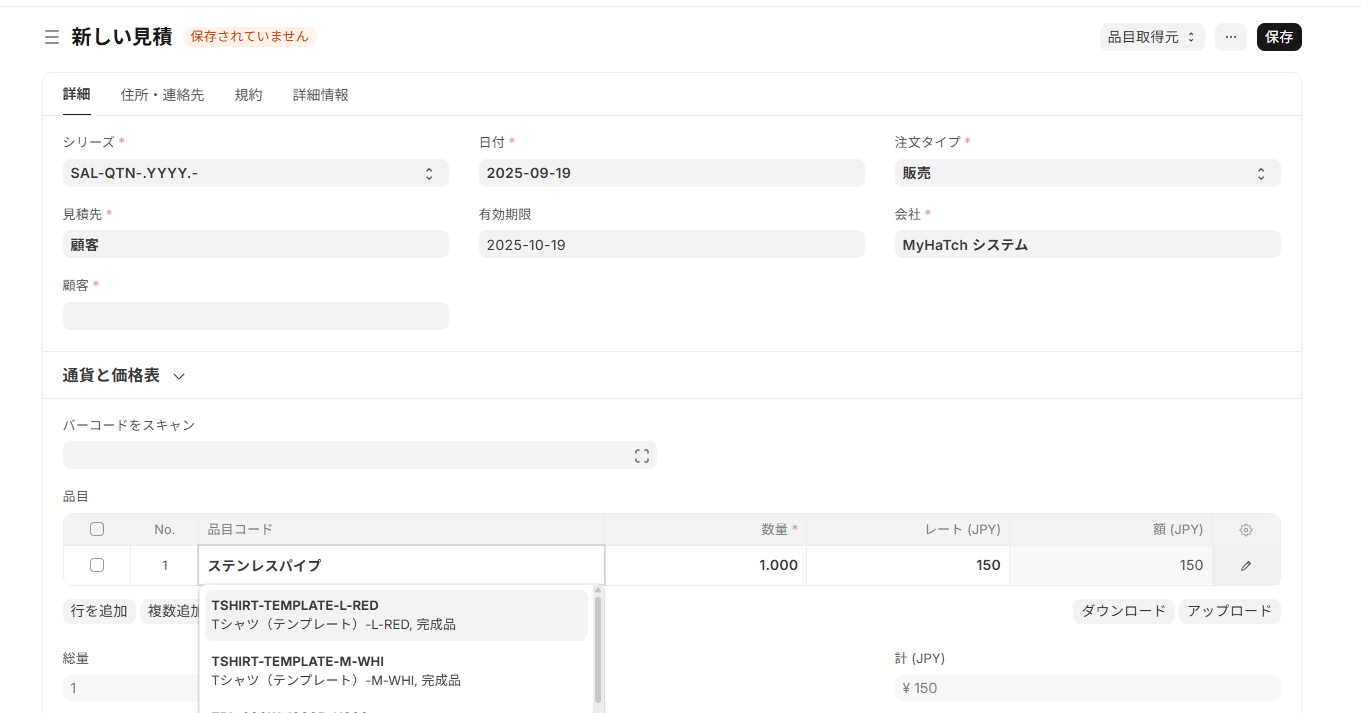 Sales order screen. You can select a variant from the template using the dropdown menu.
👉 As you can see from the actual screen, ERPNext.JP makes it easy to handle both the overall picture and the details. In the next chapter, we will summarize the overall benefits of introducing variant functionality.
6. Summary — Variant management in ERPNext.JP is an essential function.
Variations such as different sizes and colors are commonplace in many industries. However, without a proper management system, problems such as missed corrections, difficulty in monitoring inventory, and challenges in sales analysis can arise.
With ERP Next.JP,
- Separate and manage common parts and differences in item templates and variants.
- Apply BOM changes to all variants at once
- Understand inventory both "overall" and "by variant".
- Simplify sales analysis and order entry.
In this way, you can streamline all aspects of manufacturing, inventory, and sales.
👉 Variant management is not just a "nice-to-have" feature, but an essential function to protect the workplace from confusion. With ERPNext.JP, you can start using this system as a standard feature right away, starting from just 30,000 yen per month.
Related articles
 8 min
8 minBreaking the Limitations of Excel Inventory Management — Eliminating the "Invisibility" of Inventory with ERPNext
Inventory discrepancies, taking a whole day to complete inventory counts... This article explains how ERPNext.JP solves these problems, from its overall functionality to the benefits of implementation.
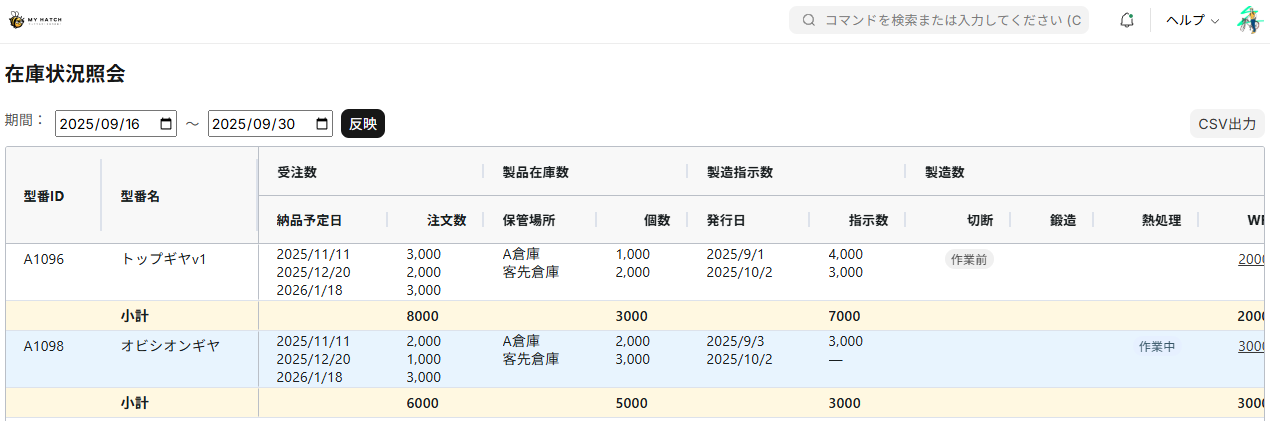 5 min
5 minView inventory in an Excel-like format — ERPNext.JP's inventory status inquiry screen
Introducing an inventory inquiry screen that's intuitive even for those familiar with Excel. The item x warehouse matrix display visualizes inventory status in real time.
 7 min
7 minAdd fields without coding — customize fields to fit your business.
This guide shows you how to add new input fields to the ERPNext screen without coding. You'll learn how to use various field types such as text, date, select, and link.