
[Free & Open Source] How to set up ERPNext in Japanese in 5 minutes — ERPNext.JP Starter released (v16, Docker, MIT)
ERPNext's Japanese starter, "ERPNext.JP Starter," is now available on GitHub. It launches Frappe/ERPNext v16 in 5 minutes using a Docker container, includes 17,739 translation dictionary entries tailored to Japanese business practices, and is licensed under the MIT license. Compatible with both Windows and Mac, it provides easy-to-follow instructions even for those unfamiliar with IT.
![[Free & Open Source] Launch ERPNext in Japanese in 5 minutes — How to get started with open-source ERP](/images/documents/erpnext-jp-starter/hero-5min.png)
ERPNext can be launched in Japanese in 5 minutes.
In April 2026, we released ERPNext.JP Starter on GitHub (MIT License, free). It allows you to run Frappe/ERPNext v16 with a complete Docker setup and includes 17,739 entries in a translation dictionary tailored to Japanese business practices. It can be set up in 5 minutes on both Windows and Mac, as long as you have Docker Desktop installed.
👉 Repository: github.com/maihatch/erpnext-ja-starter
What is ERPNext?
ERPNext is a leading open-source ERP developed by Frappe Technologies. It covers all the necessary business areas for ERP, from accounting, sales, purchasing, inventory, manufacturing, and human resources, and is used worldwide. A major feature is that it does not use a monthly subscription model like SaaS, but rather the source code can be placed in your own environment and used freely.
However, the original version is English-based, and the Japanese UI often features unnatural translations that seem close to machine translation. It's common to hear people in Japan say, "I tried it, but gave up because the business vocabulary didn't match."
What you can do with ERPNext.JP Starter
ERPNext.JP Starter is a minimal starter package that provides a clear "gateway to Japanese."
- Translations tailored to Japanese practical use: The main screens for sales, purchasing, manufacturing, inventory, and accounting use vocabulary that is actually used in the field (17,739 entries in the translation dictionary).
- Instant startup with Docker: Start up the ERPNext core, database, cache, etc. all at once using only Docker Desktop.
- Frappe / ERPNext v16 compatible: Rolling tags
version-16This configuration makes it easy to incorporate the latest feature improvements. - Free to try and modify under the MIT License (Note: ERPNext / Frappe itself is under the GPL. Please follow their respective licenses when redistributing.)
Steps to get started in 5 minutes
Preparation: Install Docker Desktop
You only need one piece of software: Docker Desktop (free). Install it from the link below, depending on your operating system.
| OS | Source |
|---|---|
| Windows 10 / 11 | Docker Desktop for Windows |
| macOS 12 or later (Intel / Apple Silicon) | Docker Desktop for Mac |
System Requirements: 8GB or more of RAM recommended, 10GB or more of free disk space.
Step 1: Get the repository
Open Terminal (PowerShell on Windows, Terminal.app on Mac) and run the following:
git clone https://github.com/maihatch/erpnext-ja-starter.git
cd erpnext-ja-starter
When things don't go well:
gitIf the command is not installed Git official website You can install it from there, or you can get it from GitHub's "Code → Download ZIP" page.
Step 2: Start up
docker compose up -dWith this single command, 11 containers, including the database, cache, backend, and frontend, will start up all at once.
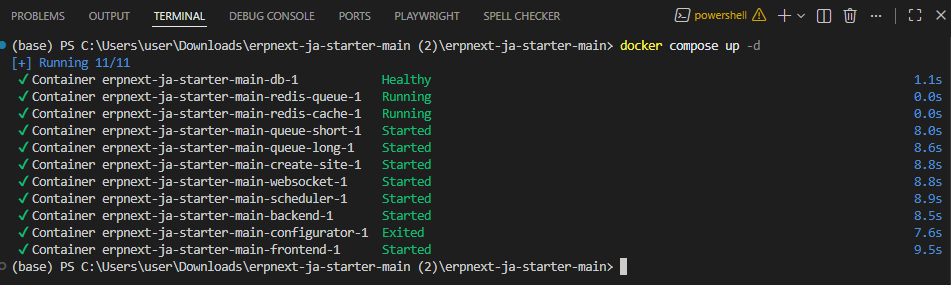
If it doesn't work: Check if Docker Desktop is running and if port 8080 is not being used by another application.
Step 3: Wait for startup to complete
Normally, it takes 3 minutes to start up, and even on low-spec systems, it will start up within 15 minutes. Initialization runs in the background, so make yourself a cup of coffee and wait.
Step 4: Log in with your browser
In your browserhttp://localhost:8080/desk When you open it, the initial setup wizard will appear. Please select Country: Japan, Time Zone: Asia/Tokyo, Currency: JPY and proceed.
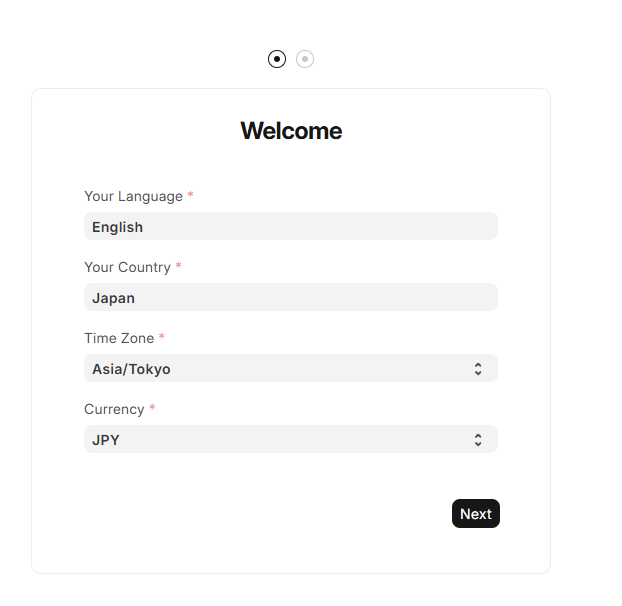
Step 5: Apply Japanese localization
After setup is complete, open Edit Profile → Language from the profile icon in the upper right corner of the screen, select "Japanese / ja", and save.
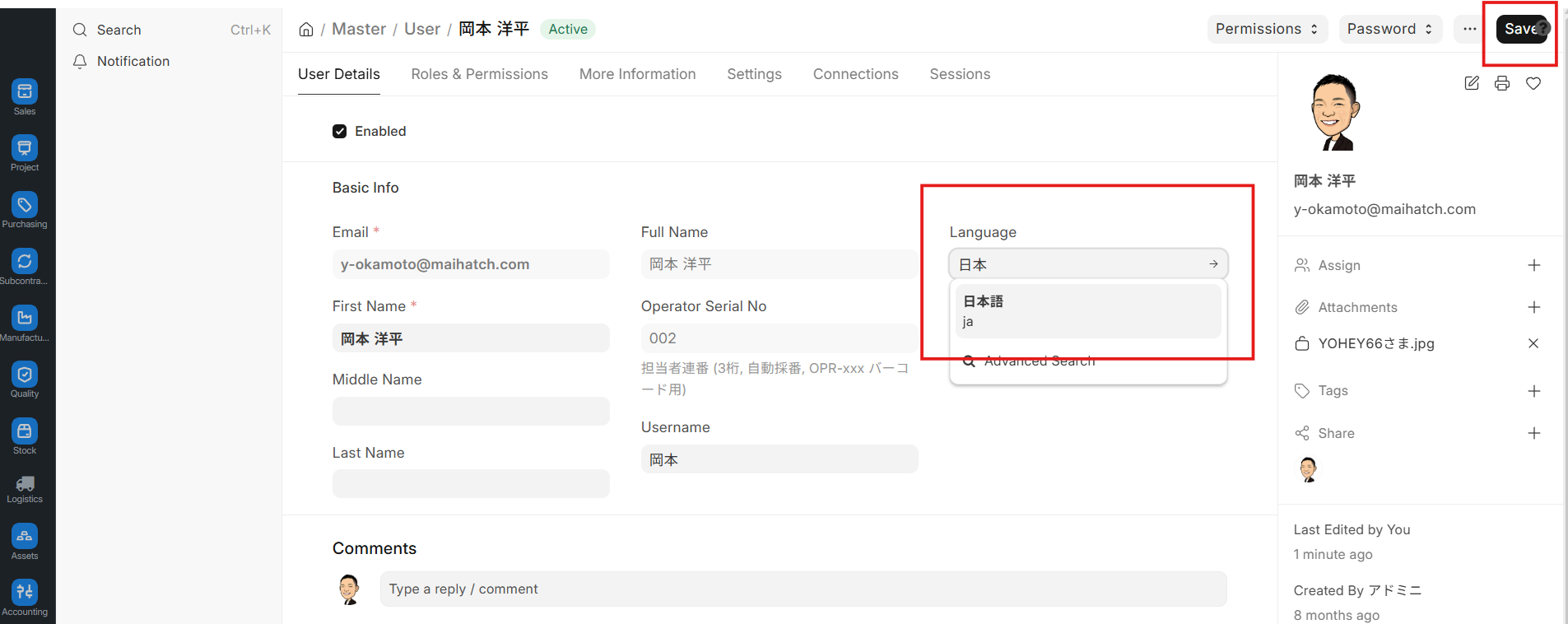
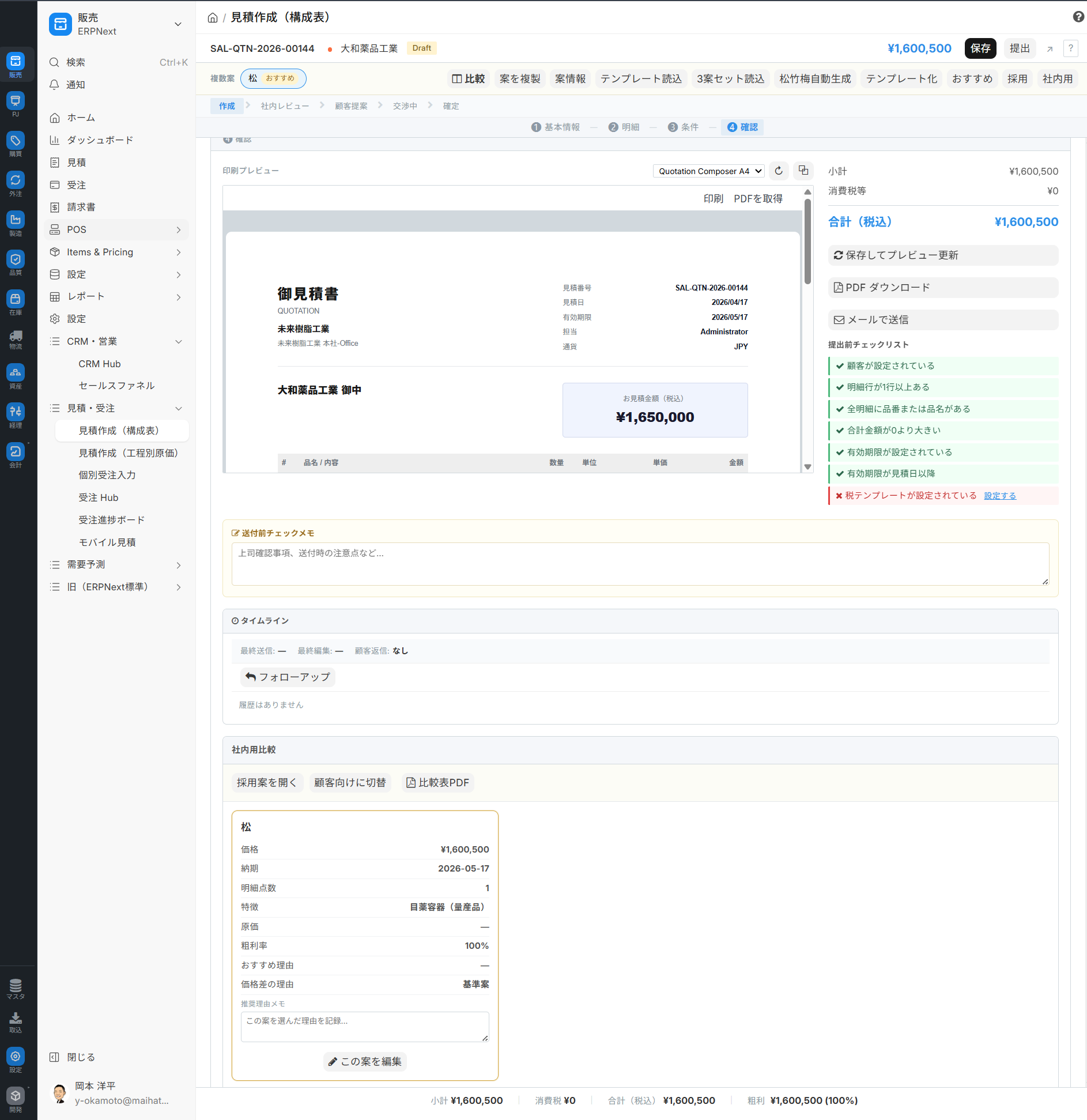
This will reflect the Japanese translation dictionary included with ERPNext.JP Starter on the screen. The main screens for sales, purchasing, manufacturing, inventory, and accounting will switch to translations that make sense in Japanese business practices.
Try it on GitHub
The repository and README are below. Issues and pull requests are welcome, such as "It works," "This is wrong," or "This could be improved." Stars are also appreciated.
👉 ** github.com/maihatch/erpnext-ja-starter **
For those considering whether it's truly possible to implement this for free
The next question that inevitably arises is, "It worked for free. But can we really integrate it into our own business operations?" We've honestly summarized the gap between the original standards and Japanese practices, and where you might get stuck if you try to create your own using AI, in a separate article, along with a 45-item rating chart.
Try it out for free for 5 minutes.
Once you get a feel for the movement,
For further consideration of full-scale implementation, please refer to the separate article and contact us for a consultation.
- Try it on GitHub: github.com/maihatch/erpnext-ja-starter (Stars welcome)
- Collaboration Welcome: Issues / Pull Requests / Translation Improvements
- Consultation: github@erpnext.jp
Notice Regarding Trademarks and Licenses "ERPNext" and "Frappe" are trademarks of Frappe Technologies Pvt. Ltd. This article and repository are a community project unrelated to Frappe Technologies and are not an official app.
Related Articles
- Can you really implement a solution using the free ERPNext? — An honest evaluation using a 45-item rating system. - Launching pad for in-house ERP development — ERPNext.JP source package - What is Open Source ERP? A thorough comparison of its mechanisms, benefits, and five major products.
Related articles
 9 min
9 minCan you really implement your system using the free ERPNext? — An honest evaluation using a 45-item rating system.
ERPNext is globally recognized as a "free, open-source ERP," but there are areas where the original standard alone is insufficient to fully implement it in the operations of Japanese companies. This 45-item rating chart visualizes the gap between the ERPNext standard and ERPNext.JP, and honestly explains three common pitfalls in the age of AI development, as well as the perspectives necessary to move forward with implementation.
![What is Open Source ERP? A Thorough Comparison of its Mechanism, Benefits, and Top 5 Products [2026 Edition]](/images/documents/erp_eyecatch_google_d_1774357580557.png) 15 min
15 minWhat is Open Source ERP? A Thorough Comparison of its Mechanism, Benefits, and Top 5 Products [2026 Edition]
This guide provides a thorough explanation of how to choose the right open-source ERP system, from the fundamentals of open-source ERP to a comparison of the features and architectures of five major products (ERPNext, Odoo, etc.), and even covers Japan-specific implementation risks (invoices, vendor lock-in).
![Average Costs for ERP Implementation [2026 Edition]: Includes a Comparison Table of All 11 Products](/images/documents/implementation/erp-cost-guide/erp-cost-guide-hero.png) 7 min
7 minAverage Costs for ERP Implementation [2026 Edition]: Includes a Comparison Table of All 11 Products
The typical cost of implementing an ERP system in a manufacturing company with 30 employees is between 2 million and 15 million yen over 5 years (Total Cost of Ownership). This guide includes a comparison table of three types (cloud, on-premise, and open-source), a cost list for 11 major products, and a 15-item checklist to prevent budget overruns.