
Five challenges in food processing and manufacturing sites that can be solved with the process performance registration screen.
Say goodbye to "Excel, paper, and handwritten" methods in food processing and manufacturing. Our open-source ERP system solves five challenges: visual checks, quality recording, container management, traceability, and ease of use.

Introduction
Common challenges in food processing and manufacturing include complex operational requirements such as visual checks, paper quality records, container management, traceability, and the difficulty of using systems.
- Check the ingredients by visually comparing the paper recipe (formulation sheet) with the actual ingredients.
- Lot management and expiration date management are tracked using handwritten notebooks.
- Photos of foreign object contamination or quality abnormalities are taken but left as they are. Later, it becomes impossible to tell which process or lot the photo belongs to.
- The contents of "tanks," "containers," and "packaging" cannot be tracked by the system.
- The traceability required for HACCP and audits by suppliers cannot be kept up with if done manually.
- Expensive, dedicated systems are unaffordable in terms of both initial setup and maintenance costs.
Therefore, what I would like you to pay attention to is, ERPNext.JP is.
Based on ERPNext, which has been implemented in over 30,000 companies overseas,
It features a custom screen tailored to Japanese food processing and manufacturing sites.
By adding a field-oriented process management screen to open-source ERP, you can achieve "truly usable" process management in food processing and manufacturing sites without relying on expensive dedicated systems.
(The full source code is handed over as part of implementation — own it as your asset. Contact us for pricing.)
Scope of Application ── Which process patterns can it be used for?
"I'm interested, but can it be used in our process?" I think this is the first thing you'll want to know.
First, please take a look at the overall scope of our services.
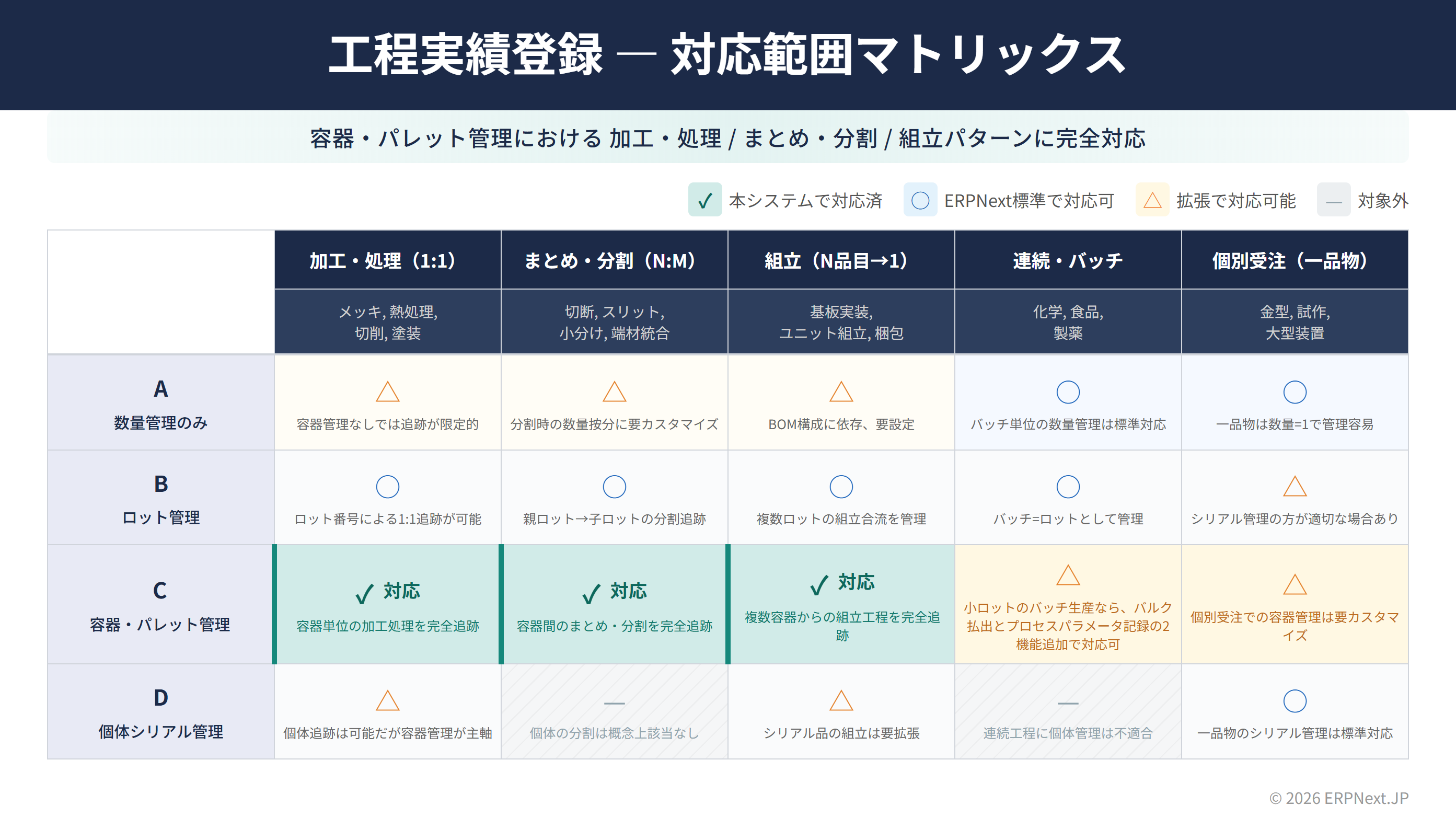
Status of responses by process pattern
This system's process record registration has a strong advantage in physical tracking, primarily focusing on container and pallet management.
✅ Fully compatible process patterns
| Process Pattern | Food Processing Example | Manufacturing Example | Explanation |
|---|---|---|---|
| Processing (1:1) | Heat sterilization, freezing, drying, fermentation | Plating, heat treatment, cutting, painting | One container (tank, tray, etc.) is placed inside, and after processing, it is produced as one container. Full tracking of processing processes per container |
| Bulking and Dividing (N:M) | Small-scale filling, bagging, dispensing after raw material blending | Cutting, slitting, scrap material consolidation | Dividing from large containers to small containers, consolidating multiple containers, etc. Complete tracking of bulking and dividing between containers |
| Assembly (N items → 1) | Blending/Formulation (Multiple raw materials → 1 product), Bento box preparation | Circuit board mounting, Unit assembly, Packaging | Multiple containers are input to create one product. Input items are automatically checked using a Bill of Materials (BOM). |
○ Process patterns that can be handled with standard functions
| Process Pattern | Food Processing Example | Manufacturing Example | Remarks |
|---|---|---|---|
| Continuous/Batch | Continuous filling of beverages, large-scale preparation of sauces | Chemicals, pharmaceuticals | Batch-level quantity management is supported as standard. Recording of process parameters (temperature, time, etc.) can be added as an additional function. |
△ Process patterns that can be handled by expansion
| Process Pattern | Specific Example | Remarks |
|---|---|---|
| Custom Orders (One-of-a-Kind Items) | Custom cakes, OEM manufacturing / molds, prototypes | One-of-a-kind item management is standard. Customization specific to each order may be required. |
Response status by management level
The level of detail in management can also be categorized into four levels.
| Management Level | Status of Implementation | Examples of Use in Food Processing |
|---|---|---|
| A. Quantity Management Only | ○ to △ | While quantity management is possible, the true value of this system lies in container management. |
| B. Lot Management | ○ | Tracking of raw material lots, tracking of splitting from parent lot to child lot (large bag to small portion), and managing the merging of formulations from multiple lots. |
| C. Container and Pallet Management | ✅ The Core of This System | Complete tracking of contents and condition at the tank, tray, container, and pallet level. Ideal for food processing. |
| D. Individual Serial Number Management | △ | Individual tracking is possible, but container management is the primary method. |
What I can and cannot do (frankly)
Strengths: Working in environments where physical goods are managed using containers (tanks, trays, boxes, pallets, etc.). I enjoy tasks that involve tracking "what's inside this tank" and "which raw materials were used to create which product." I am particularly strong in lot traceability in the food processing industry.
👉 What the standard features cover:: Lot management, quantity management, input item checks using bill of materials (BOM), quality records (defect records, inspections, photos), and traceability.
👉 Things that may require customization: Parameter management in continuous production processes (temperature, pressure, pH, etc.), automatic calculation of best-before and expiration dates, automatic allergen management checks, and automatic synchronization with standard inventory in the ERP system (since this system operates independently as "Shadow WIP", synchronization with standard inventory requires separate configuration).
So, let's look at five specific points to see what problems can be solved.
❶ Don't rely on visual inspection; verify the actual item by scanning.
▶ Before
In food processing plants, ingredients are visually checked against a recipe (formulation sheet), weighed, and added. Mistakes in ingredients or formulation errors are only noticed after the taste or appearance is deemed abnormal. Skipping steps in the process (such as packaging semi-finished products that haven't yet undergone sterilization) also relied solely on human attention.
▶ After — The system verifies "what, how many, and in the correct order" simply by scanning.
When you scan the barcode on the manufacturing order, the bill of materials (BOM) is automatically generated and displayed on the screen as a list of "what ingredients to add and in what quantities."
When you scan the raw material container, the system automatically checks the following:
- ✅ Item Check — Ensure the ingredients match those listed in the recipe (to prevent mixing up sugar and salt).
- ✅ Quantity Check — Real-time updates on the availability of the required quantity (OK / Shortage / Excess displayed in different colors)
- ✅ Process Sequence Check — Checks if the previous process (sterilization, cooling, etc.) is complete (automatically displays the completion date and time of the previous process).
- ✅ Lot Check — Automatically blocks mixing of different lots.
If an ingredient not listed in the formula is added, it will be displayed separately as "unassigned," allowing for immediate detection of the abnormality.
Also handles food ingredients and work-in-progress items that cannot have barcodes attached.
We often hear comments like, "We can't put barcodes on our work-in-progress items." This system addresses this issue:
- Automatic container label generation — With a single click of the issue button, a container label PDF with a barcode is automatically generated. Simply attach it to tanks or trays for all subsequent scanning.
- Supports packaging conversion — For example, scanning a case containing "12 packs per case" will automatically count it as 12 packs, supporting coefficient conversions for each unit of packaging (UOM). Convenient for filling large bags into smaller bags, and for inputting raw materials in case units.
💡 Key Point: Shifting the verification of input items from "human visual inspection" to "automatic system judgment." Instead of dealing with rough material mix-ups, formulation errors, and skipped processes after they occur, prevent them before they happen. This is the mechanism of "poka-yoke."
❷ Gather information from the field on the spot
▶ Before
Even when foreign objects or discoloration are found, they are put off with the excuse of "I'll write about it all later." As a result, when, in which process, what, and why it happened becomes vague, and accurate quality records are not kept. Photos are buried in the camera roll of smartphones, and you end up searching around wondering, "Which lot is this photo from?" Handwritten temperature records and work notes also remain dormant in notebooks.
▶ After — Smartphone photo → Automatically linked to work log
The Quality Record Panel slides in from the right side of the screen. It opens with a single press of the function key (F5), allowing you to record quality information without interrupting your work.
📸 Automatic syncing of smartphone photos — This is its biggest feature.
When you want to take a photo of a product containing a foreign object or discoloration, press the "Start Photo Import" button on the screen, and a QR code will be displayed.
- A QR code will appear on the screen.
- The worker scans the QR code with their smartphone.
- The smartphone camera activates → Take a picture.
- Photos you take are reflected on your PC screen in real time within seconds.
- Photos are automatically linked and saved with information such as "which equipment," "during which operation," and "for which lot."
No dedicated camera is required. The worker's smartphone can be used as the camera.
It can also be used to import handwritten notes. Temperature check sheets, handwritten CCP (Critical Control Point) records, and handover notes written in notebooks can all be photographed with your smartphone and linked as images to the digital record of that task. This allows you to store records digitally as a backup without abandoning paper, fulfilling the "record keeping" requirement for HACCP compliance.
🗑️ Defect/abnormal record keeping is completed on the spot.
If foreign objects are found or products are found to be substandard, a three-step selection input is performed on the spot:
- Type of abnormality — Select using a button (foreign object contamination, discoloration, unusual odor, substandard, etc.)
- Cause — Options linked to the type are automatically displayed.
- Degree — Minor / Moderate / Severe
Because it's a multiple-choice format rather than free-response, data is stored in a unified format. This makes it possible to directly compile and analyze data such as "How many abnormalities were reported today?" or "Is this equipment prone to foreign object contamination?"
🔍 Inspection Records
The system automatically reads test items (Brix value, pH, moisture content, total bacterial count, etc.) associated with each product, and records them using OK/NG buttons or numerical input. It also has an automatic comparison function against acceptable ranges.
💡 Key Point: From "writing it all down later" to "recording it the moment it happens." In particular, the automatic linking of smartphone photos is a groundbreaking system that completes records linked to lots and processes just by taking a picture. This significantly reduces the operational burden of HACCP record keeping.
❸ Can be managed in units of tanks, containers, and boxes.
▶ Before
ERP inventory management is based on "item x warehouse x quantity." However, in a food processing plant, it's important to know things like "even though it's the same soup, the batch in tank A and the batch in tank B were prepared on different dates" and "this refrigerator container is still half full." The contents and condition of the containers were managed using whiteboards and Excel.
▶ After — Integrating containers into the system as "visible units"
In this system, containers (tanks, trays, containers, boxes, pallets, etc.) are treated as one of the management units.
In addition to lot management, improve container management
Traditional lot management systems will remain in place. Container management is an "additional management layer" built on top of that.
| Perspective | Lot management only | Lot + container management |
|---|---|---|
| Inventory Granularity | "Lot A is 50kg" | "Lot A: 20kg in tank T-001, 15kg in tray B-002, 15kg in container C-003" |
| Partial Use | Managed by the remaining amount of the entire lot | Real-time updates of the remaining amount for each container. Know exactly when "this tank is still half full." |
| First-In, First-Out | Estimated based on preparation date | Confirmed based on container ID. Ensures accurate record of which tank's contents were used first. |
| Location Tracking | Where is the lot located? | Which process is the container in, and which refrigerator is it being stored in? |
| Accuracy of Inventory | Lot remaining quantity in the ledger | Contents can be determined by checking the container. Physical reality and system quantities match |
The condition of the container can be seen at a glance
The container has a clear condition:
| Condition | Example in food processing |
|---|---|
| Available | Ready to be prepared and used in the next step |
| Processing in progress | Being poured into the mixing tank (not yet used up) |
| Consumed | Completely used up |
Containers that have been partially used will remain in a "processing" state, retaining the remaining amount, allowing you to use the rest at a later time. The system will accurately reflect that "there is still 3kg of seasoning left in this tank."
Automatic container label printing
A container label PDF with a barcode is automatically generated upon registration. Print it out and attach it to your tanks or containers for easy scanning and tracking throughout all subsequent processes. Reissuance is also just one click away.
💡 Key Point: From a two-dimensional management system of "item x warehouse" to a three-dimensional management system where "the contents of each tank and each box are visible". This naturally enables the "tracking of preparation units" and "first-in, first-out" practices required in food processing.
❹ Automate the creation of traceability
▶ Before
Records of "which raw material lot produced which product" relied on handwritten notebooks and Excel spreadsheets. Responding to traceability inquiries from suppliers and health authorities involved flipping through vast amounts of notebooks and spending hours poring over them. While centralized record-keeping is required under HACCP regulations, relying on paper and verbal communication has its limitations.
▶ After — Automatically records the relationship between input and generation.
Once you confirm the operation, the link between the containers you added and the containers you generated is automatically recorded.
The linking method can be set for each piece of equipment and selected according to the nature of the process:
| Method | Movement | Examples of applications in food processing |
|---|---|---|
| First-In, First-Out (FIFO) | Containers are allocated in the order they are loaded | Preparation → Filling line, Packaging process |
| Last-In, First-Out (LIFO) | Allocate containers in the order they were added | Process of removing from the top of the tank |
| MIX | Linking total input × total generation | Mixing in the blending/combination tank, soup preparation |
This record will be saved as an non-modifiable audit log. It cannot be tampered with later.
Reasons why it is especially important in food processing
- Recall Response: If a problem is discovered with a raw material lot, identify which products used that lot in just a few clicks. Understanding the scope of impact is reduced from several hours to just a few minutes.
- Inquiries to suppliers answered: The system immediately provided an answer to an inquiry such as, "Please tell us the lot number of the raw materials used in your product lot XXX."
- Linking with HACCP records: CCP records for each process are automatically linked to containers and lots, enabling centralized record management.
By turning on the container transfer function, the ID and lot number of the input container can be directly transferred to the production container. The same container ID can be used to track processes across stages, allowing you to instantly trace back "which raw materials were used to make this final product."
💡 Key Point: Transform traceability inquiries from "flipping through notes" to "inquiring through the system." Identifying the scope of impact during a recall can be completed in minutes, significantly improving your ability to respond to business partners and audits.
❺ Can be used with just the scanner and function keys
▶ Before
Despite introducing a highly functional system, the interface was too complex for part-time workers and veteran employees to use effectively. A culture of postponing system input became entrenched due to concerns that "if you make a mistake, you can't undo it." As a result, paper ledgers remained, creating a dual management system.
▶ After — Scan to proceed, operate with keys, and easily redo.
🔫 All basic operations involve barcode scanning.
Simply scan the barcode sheet attached to the workbench, and each operation will be performed. No need to touch the keyboard or use a mouse.
Overall workflow:
設備ログイン → 製造指図スキャン → 原材料容器スキャン(繰り返し)
→ 完了スキャン → ラベル自動発行 → 次の作業へ
Similar to the packaging and inspection screen, actions such as "Complete," "Hold," "Cancel," and "Report Problem" are all performed by scanning a dedicated command barcode. Workers can complete the entire process while holding the scanner. It can be operated even while wearing gloves, making it suitable for the hygienic environment of food processing.
⌨️ Shortcuts using function keys
Frequently used operations are already assigned to function keys:
| Keys | Operation |
|---|---|
| F3 | Registration preparation (Confirm the number of containers and quantity of the generating containers) |
| F4 | Container printing (Label PDF output) |
| F5 | Open Quality Records Panel |
| F6 | Batch Issue |
| F7 | Register leftover materials |
| F8 | Task complete (reset and proceed to the next task) |
| F9 | Inspection Registration |
🔄 You can try again even if you make a mistake — Responding to "oops" moments on the job site
The biggest advantage is that it eliminates the worry of "What if I make a mistake?" We offer three stages of redoing:
| Rework Stage | Common Scenarios | What You Can Do |
|---|---|---|
| ① Cancel Input | Incorrect raw material scanned | Return the container using the Cancel button. Quantity will also be restored. |
| ② Deletion before issuance | Incorrect quantity or number of containers | If it's before issuance, delete the planned row and re-enter |
| ③ Canceling the previous operation | It has already been issued (confirmed) | If subsequent operations have not yet been performed, the entire operation can be canceled. Delete the container and restore the input. |
However, containers that have been confirmed and are being used in subsequent operations cannot be canceled. This is a safety design that does not disrupt already confirmed traceability. Even if a cancellation occurs, the record will remain as "canceled," and the audit trail will be preserved.
💪 It's OK even if your browser crashes
Since your equipment login is maintained on the server side, even if your browser crashes or you close the tab, logging in again with the same user will restore all your work in progress.
💡 Key Points: "Can be operated with just the scanner," "Can be redone if you make a mistake," and "Can be resumed even if it freezes." Because it has all three of these features, both part-timers and veterans can use it without fear.
summary
| Problem | Solution for this screen |
|---|---|
| ❶ Relying on visual inspection | Automatic detection via scanning + poka-yoke + support for packaging changes |
| ❷ No on-site information is recorded | Smartphone QR code photo + selectable defect record + inspection template |
| ❸ Cannot be tracked by container | Management at the tank, box, and pallet level + automatic label generation |
| ❹ Manual traceability | Automatic linking of input ↔ generation + audit logs + recall response |
| ❺ The system is difficult to use | Scanner operation + function keys + undo + return |
The process performance registration screen introduced in this article is a custom screen for on-site use built on top of ERPNext (open-source ERP). ERPNext itself is free to use and integrates seamlessly with core business operations such as purchasing, sales, inventory, and accounting.
Because the processing and assembly/blending processes share common operating components (equipment login / container issuance table / quality record panel / footer operation), the same user experience can be maintained even as the number of processes increases.
Instead of a choice between "buying an expensive dedicated system or making do with Excel," there's a third option: adding user-facing screens to an open-source ERP system. Get a system that's "really usable" in food processing and manufacturing sites, while keeping costs down. That's the "realistic solution" for open-source ERP.
👉 First, try it out with the free trial. We encourage you to experience firsthand how well it fits your company's food processing and manufacturing operations.
Related articles
 5 min
5 minFrom order placement to shipment, everything is visible. Integrated ERP for the food processing industry.
This article explains the features of ERPNext.JP, which is specifically designed for the food processing industry. It supports FAX-OCR order import, barcode data entry, lot tracking, and monthly cost calculation as standard features, plus Japanese specifications.
 5 min
5 minAutomate the approval flow — ERPNext Workflow Feature Guide
This guide explains how to build multi-stage approval flows, such as quotation approval and purchase approval, using ERPNext. It summarizes the operation procedures for the settings screen and points to note during operation.
 8 min
8 minCentralized management of size and color variations — How to use the item variant function
How to manage variations in size, color, and specifications of the same product using ERPNext? This guide explains the setup procedure and operational tips for the variant function, complete with screenshots.