
Building ERPNext on a VPS from scratch — A guide with actual data from ConoHa VPS
This guide explains how to install ERPNext on ConoHa VPS yourself, along with actual performance measurement data. We'll also compare four VPS providers, outline the setup procedure, and honestly reveal the hidden costs of building it yourself.

Introduction — The Advantages of Building It Yourself
ERPNext is open-source software under the GPLv3 license.
Those with the necessary technical skills can build their own environment on a VPS and run ERPNext on it.
Advantages of building it yourself:
- VPS server fees alone start from around 2,000 yen per month
- Log in to the server via SSH,
benchMaintenance freely via command line - Gain a deep understanding of how ERPNext works (ideal for learning and verification purposes)
- Frappe Framework
bench consoleYou can call the API directly from Python.
This article will share actual measurement data from when the author actually installed ERPNext on ConoHa VPS, a comparison of major VPS services, and setup procedures.
And finally, I'll be honest about the hidden costs of building it yourself.
VPS Service Comparison (Latest Prices as of 2026)
This article compares potential VPS services for running ERPNext in the cloud.
Selection criteria
- Cost: Can monthly costs be kept down?
- Performance: Will ERPNext run smoothly? (Frappe official recommendation: Minimum 2GB RAM, 4GB RAM or more recommended)
- Maintainability: Is it easy to use terminal operations and snapshots?
- Region: Does the server have a base in Japan?
Summary Table (Based on 4GB RAM class)
| Service | Recommendation Level | Plan | Monthly Fee (Tax Included) | Main Features |
|---|---|---|---|---|
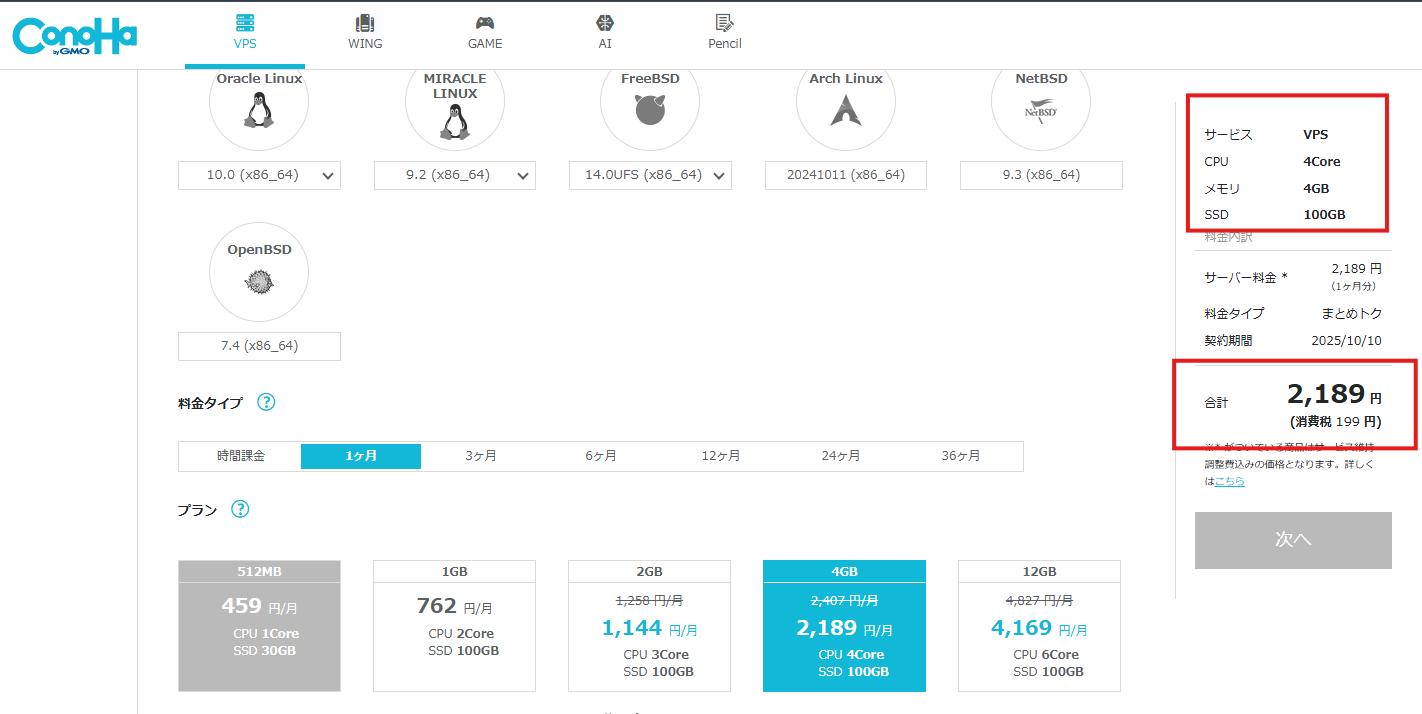
| ** ConoHa VPS ** | ⭐⭐⭐ | 4GB/4 cores | Approx. ¥2,408 (1 month) - ¥1,860 (36 months) | Excellent cost-performance balance, flexible maintenance |
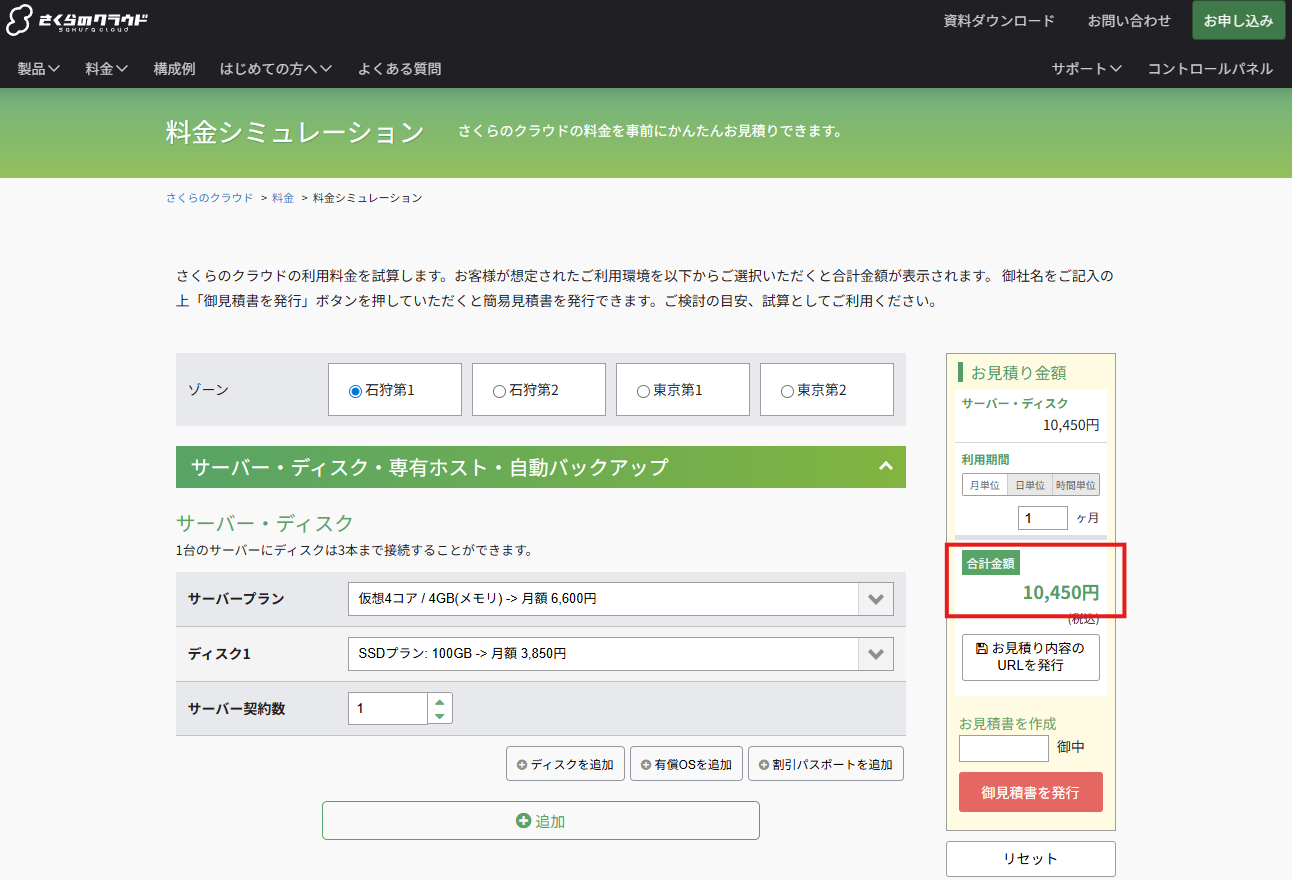
| ** Sakura VPS ** | ⭐⭐ | 4GB/4 cores | Approx. ¥3,227 (Ishikari, 12-month lump sum payment) | Extensive domestic region coverage and stable operation |
| AWS EC2 | ⭐ | t3.medium (4GB) | Approximately 4,500 yen ($30/month, Tokyo On-Demand) | Scalable but expensive and complicated to configure |
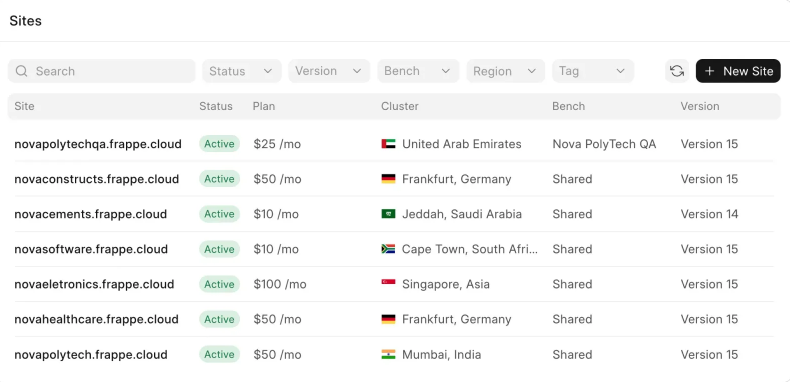
| ** Frappe Cloud ** | ⭐ | Equivalent to 4GB | $25-50/month | Official GUI management, but SSH not available, overseas region |
Details of each service
🌳 ConoHa VPS [Recommended]
- VPS service provided by GMO Group
- Good response in the Japan region (Tokyo)
- A 4-core/4GB/200GB SSD configuration is available for approximately 2,000 yen per month.
- Further discounts available with long-term contracts (bundle deals)
- Easy snapshots and restarts from the management screen.
- In the SSH terminal
benchThe operation is smooth.
🌸 Sakura VPS
- Server locations are located within Japan (Tokyo, Osaka, Ishikari).
- 4GB/4 cores → Approximately ¥3,227/month and up (Ishikari region, 12-month lump sum payment)
- The Tokyo region costs approximately 3,630 yen/month.
- Easy to use from the web panel.
🌊 AWS EC2
- A globally used cloud infrastructure
- Excellent scalability and reliability.
- t3.medium (2vCPU/4GB) on-demand monthly feeapproximately $30 (≒4,500 yen) + EBS storage fees
- The setup process is complicated for those unfamiliar with configuration, making it difficult to recommend to beginners.
🦷 Frappe Cloud
- Cloud service officially provided by Frappé, the developer of ERPNext.
- Fastest installation and updates with GUI-based processing.
- Terminal operations via SSH are not possible —
bench updateOperational commands such as the following cannot be executed. - The server is in an overseas region, so there may be some delay from Japan.
Important Notes Regarding Frappe Cloud
Building custom applications is tricky and prone to pitfalls. As a result, many applications don't even make it to operational use, and it's not recommended for full-scale manufacturing operations.
Conclusion
With the exception of cases such as having an existing AWS environment, ConoHa VPS is the cheapest and most comfortable option for self-hosting.
In actual use, it performs well enough to run ERPNext smoothly.
Actual measurement data on ConoHa VPS
We actually launched ERPNext on a ConoHa VPS (4 cores/4GB RAM) and measured its performance.
Access Speed
This is the result of accessing ERPNext on ConoHa VPS (Tokyo region) from Saga City using iPhone tethering.
This measurement was taken under conditions slower than a typical fixed-line connection.
Measurement Environment:
- Download speed: 14.3 Mbps / Upload speed: 23.5 Mbps
- Latency: 9 ms (Server: Tokyo)
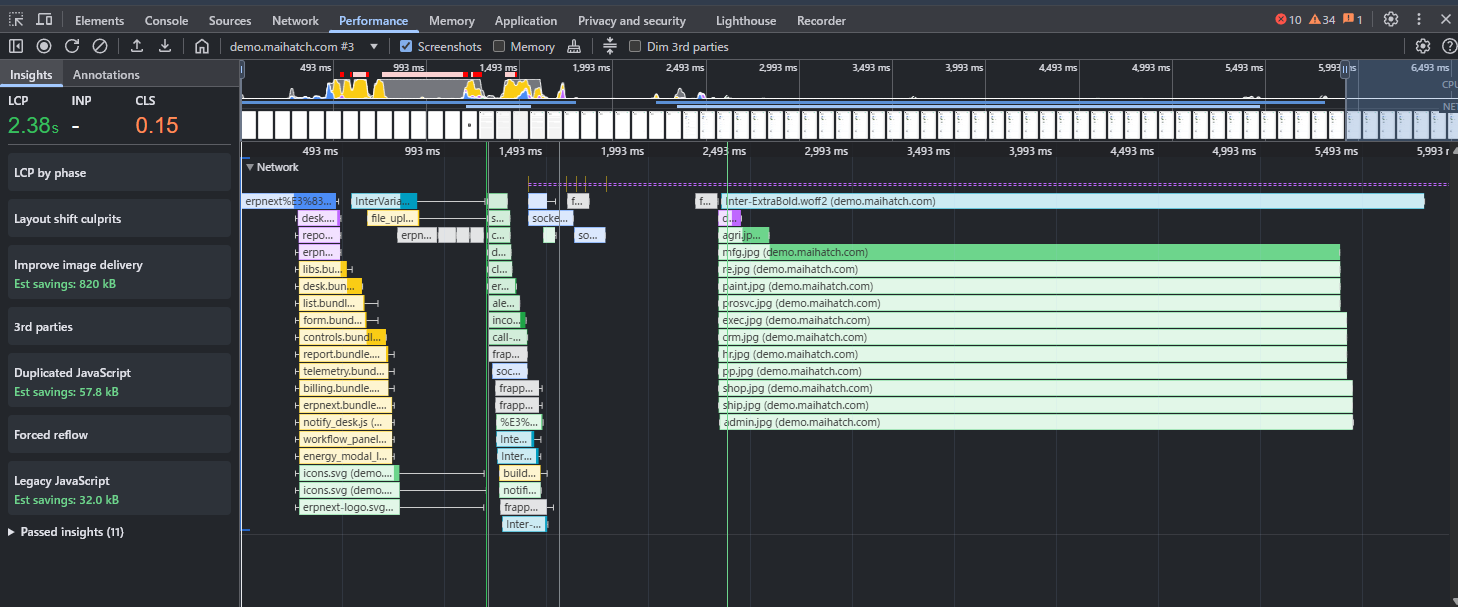
- LCP (Largest Contentful Paint): 2.38 seconds → Main content is displayed within 3 seconds. Sufficient for business use.
- CLS (Cumulative Layout Shift): 0.15 → Less jerking and more stable page display.
- Network transfer volume: Approximately 3MB → Standard for ERPNext
We confirmed that even under poor communication conditions, it provides speeds sufficient for business use.
Server load status (htop)
This is the htop result while ERPNext is running.
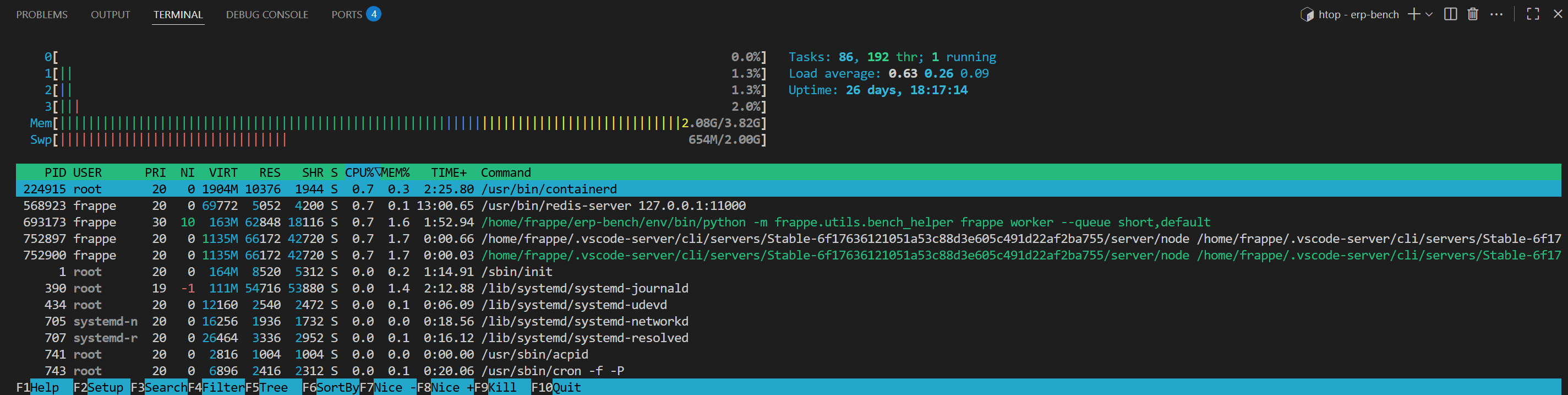
- Load Average:
0.63 / 0.26 / 0.09→ Less than 1.0 for 4 cores. Plenty of headroom in the CPU. - Memory:
2.08G / 3.82GUsage (approx. 55%) → 1.7GB always available - Swap:
654M / 2.00GUsage (approx. 33%) → No thrashing observed, stable. - Operating time: 26 consecutive days of operation, no restarts.
For normal tasks (viewing forms, searching, creating documents), there is ample CPU and memory resources.
This configuration (4C/4GB) is sufficient for small to medium-scale operations (fewer than 30 simultaneous users).
If you feel your performance is declining, you can also scale up to the 8GB plan (approximately 3,600 yen/month).
Direct operation from SSH terminal
With ConoHa VPS, you can access the server via SSH.bench update ornginx reload You can directly execute operational commands such as these.
especiallybench console It's powerful. Because you can directly access the Frappé API from Python, tasks that would take dozens of clicks on a GUI can be handled with just a few lines of script.
Example: Bulk hiding fields in the employee master
bench console# bench console 上で実行
fields = [
"passport_number",
"health_insurance_no",
"driving_license_no",
]
for fieldname in fields:
df = frappe.get_doc("Custom Field", {"dt": "Employee", "fieldname": fieldname})
if df:
df.hidden = 1 # 非表示フラグを立てる
df.save()
print(f"{fieldname} -> hidden")bench consoleThe ability to operate it directly from there is a significant advantage in terms of flexibility and speed in operation and maintenance.
This operation is not possible in Frappe Cloud.
Setup Procedure (Overview)
This is the basic procedure for installing ERPNext on ConoHa VPS.
-
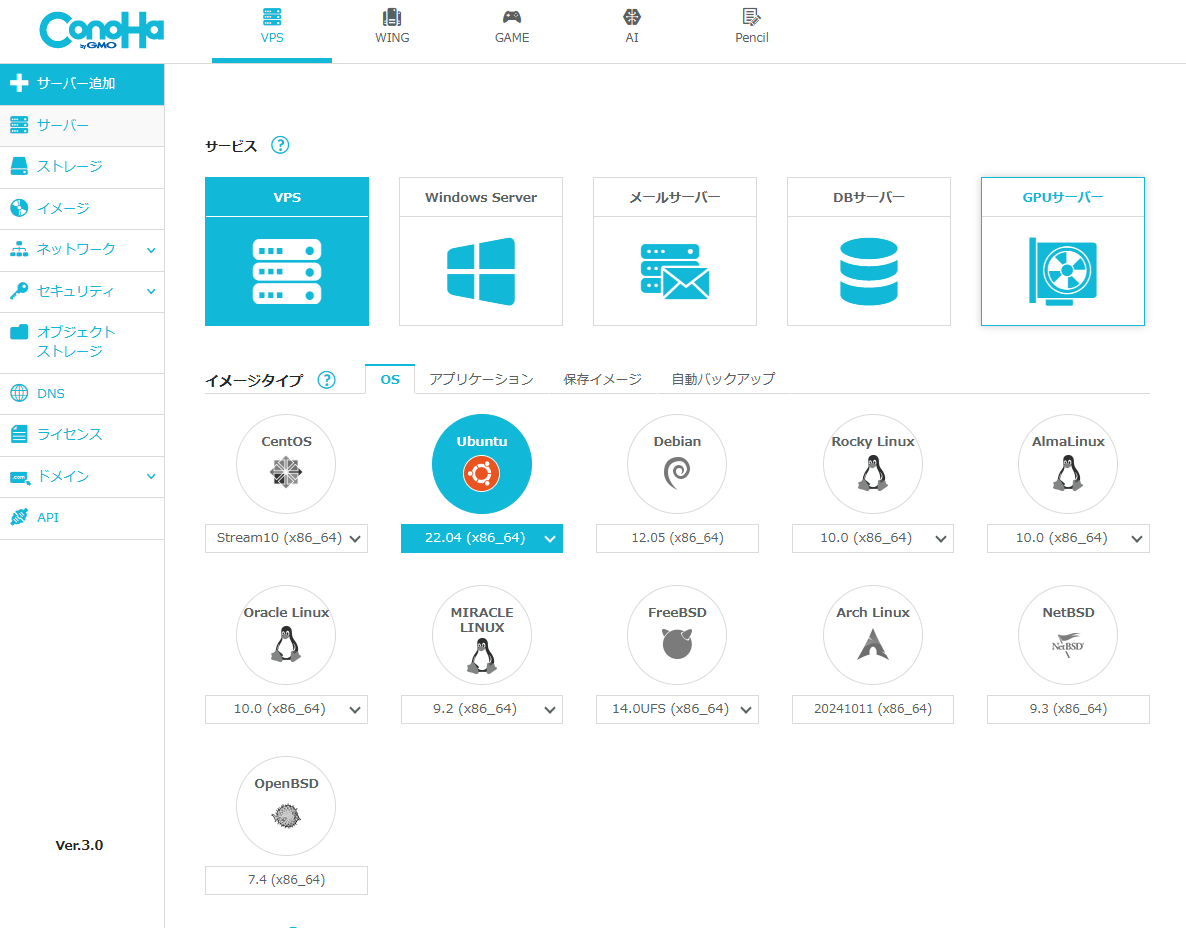
Create a VPS — Create a server with 4 cores/4GB on ConoHa VPS
-
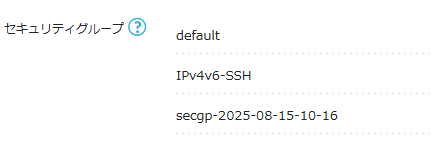
Security Settings — Open SSH (IPv4 and IPv6) and the development server port (TCP 8000).
-
SSH Key Setup — Set up passwordless login with public key authentication

-
Domain Settings — Setting up A records for your custom domain, obtaining SSL/TLS (using certbot, etc.)
-
ERPNext Installation
# パッケージ更新
sudo apt update && sudo apt upgrade -y

# 依存関係インストール
sudo apt install -y python3-dev python3-pip python3.11-venv \
    redis-server mariadb-server xvfb libfontconfig wkhtmltopdf curl

# bench専用ユーザー作成
sudo adduser frappe
sudo usermod -aG sudo frappe
su - frappe

# bench(Frappe CLI)インストール
pip3 install frappe-bench

# bench init
bench init --frappe-branch version-15 frappe-bench
cd frappe-bench

# サイト作成
bench new-site your-site.example.com

# ERPNextインストール
bench get-app --branch version-15 erpnext
bench --site your-site.example.com install-app erpnext

# 開発サーバー起動(確認用)
bench start
In your browserhttp://<VPSのIP>:8000 If you access the URL and the ERPNext login screen appears, the process was successful.
In productionbench setup production Then we switch to nginx + supervisor management.
Honest Warning — Hidden Costs of Building Your Own Game
While VPS server fees are around 2,000 yen per month, there are many other costs involved in actually running a VPS.
| Required tasks | Frequency | If done independently |
|---|---|---|
| ERPNext update | 1-2 times per month | Functionality testing and bug fixing required after version upgrade |
| Security patch application | Ongoing | Addressing vulnerabilities in Ubuntu / MariaDB / Redis / nginx |
| Backup Operations | Daily | Building, Testing, and Verifying Restores with Automated Scripts |
| SSL Certificate Renewal | Every 90 Days | What to Do If Certbot's Automatic Renewal Fails |
| Incident Response | Irregular | Recovery work in case of VPS or ERPNext downtime |
| Japanese language support | First time | Application of translation files, consumption tax settings, and creation of forms |
summary
While it's true that building your own system is "cheaper because you only pay for a VPS," the total cost of ownership (TCO) is not limited to just that.
The key factors in deciding whether to adopt Linux/Python/ERPNext are whether the company has engineers proficient in these technologies and whether the learning costs are considered an investment.
If you find it difficult to do it on your own
"I set up my own VPS, but Japanese language support and operation/maintenance are a real pain..."
If that's the case, please consider ERPNext.JP: the full source code is delivered fully configured as your own asset, or we can run the servers for you with an optional managed cloud plan (contact us for pricing).
- Japanese language environment and manufacturing industry customization are set up from the start.
- Leave all your backup, security, updates, and incident response needs to us.
- Unlimited number of accounts
- 14-day free trial available
For more details ERPNext.JP Implementation Cost Guide Please take a look.
Related articles
 4 min
4 minHow to start — see the screen in 1 minute
Press the "Try now" button on this site and within 1 minute you'll get a login link to the demo. Three progressive stages — look only, evaluate after a meeting, and your own dedicated environment — let you try ERPNext as deeply as you want.
 7 min
7 minERPNext.JP Implementation Cost Guide | Own the Source as Your Asset
We reveal ERPNext.JP's cost structure: the full source code is handed over so you own the system as your asset. Includes a comparison of four major ERP systems. Contact us for pricing.
 9 min
9 minCan you really implement your system using the free ERPNext? — An honest evaluation using a 45-item rating system.
ERPNext is globally recognized as a "free, open-source ERP," but there are areas where the original standard alone is insufficient to fully implement it in the operations of Japanese companies. This 45-item rating chart visualizes the gap between the ERPNext standard and ERPNext.JP, and honestly explains three common pitfalls in the age of AI development, as well as the perspectives necessary to move forward with implementation.