
Is it okay even with 1,000 users? — ERPNext Load Test Results Report
We've published the results of our actual tests on ERPNext's concurrent connection performance. The analysis of response time, throughput, and bottlenecks will help you determine if it's suitable for your company's scale.

1. Introduction
For companies considering implementing ERPNext, "How many people can use it at the same time?" "How long does it take to get a response?" This is a point of great interest to me.
Knowing the system's processing power makes it easier to determine the necessary server specifications and future expansion plans. This time, we used a near-minimum configuration environment, ConoHa VPS (4 cores/4GB), to actually perform a load test.
The purpose is to determine "how many simultaneous users a small business can comfortably use when implementing ERPNext?"
2. Test Environment
The tests were conducted in the following environment.
- Server: ConoHa VPS 4core / 4GB memory
- OS: Ubuntu 22.04 LTS
- App: ERPNext v15 (Frappe Framework v15)
- Client: Running ab/wrk from a local PC (WSL2 Ubuntu)
A "client" is a PC that sends test requests. We generated a large volume of traffic from this PC and measured the response time returned by ERPNext.
3. Testing Method
We used two different load testing tools.
-
ApacheBench (ab) A certain number of requests are sent simultaneously, and the average response time is measured for each number of simultaneous connections.
-
wrk Check the latency distribution (what percentage of the time it takes and for how many seconds) and the number of timeouts.
The target is the homepage (/) of ERPNext. The tests were conducted assuming 10 / 20 / 30 / 40 / 50 simultaneous connections.
4. Test Results
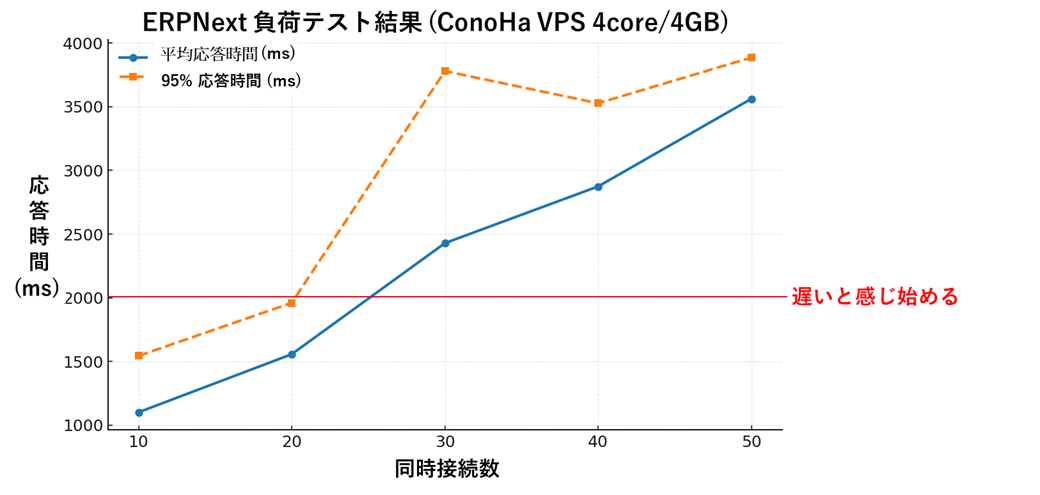
4-1. ApacheBench (ab)
The results of ApacheBench are as follows:
| Number of concurrent connections | Requests/sec | Average response time (ms) | 95% response time (ms) | Maximum response time (ms) |
|---|---|---|---|---|
| 10 | 9.1 | 1101 | 1544 | 1963 |
| 20 | 12.8 | 1557 | 1960 | 2441 |
| 30 | 12.4 | 2429 | 3780 | 9566 |
| 40 | 13.9 | 2874 | 3527 | 5021 |
| 50 | 14.0 | 3562 | 3886 | 5001 |
👉 Up to 20 people, it's stable and comfortable at around 1.5 seconds. 👉 When the number of users exceeds 30, the response time worsens to an average of 2 seconds or more, and in some cases, response delays of nearly 9 seconds occur. 👉 With 50 users simultaneously, the response time drops to 3-4 seconds, which is considered "slow" for a business system.
4-2. wrk
The wrk measurement, including the number of timeouts, yielded the following results:
| Simultaneous connections | Average latency | Maximum latency | Requests/sec | Timeout |
|---|---|---|---|---|
| 20 | 1.35 seconds | 1.88 seconds | 14.5 | 0 |
| 30 | 1.83 seconds | 2.00 seconds | 14.4 | 238 items |
| 50 | 1.37 seconds | 1.74 seconds | 14.3 | 413 items |
👉 Requests/sec plateaus at approximately 14 requests/second. 👉 Timeouts increase significantly when the number of participants exceeds 30. 👉 With 50 users, over 400 timeouts occurred.
Conclusion: ERPNext in a ConoHa VPS (4core/4GB) environment is
The maximum comfortable capacity is 20 people using it simultaneously.
When the number of users exceeds 30, response delays and timeouts occur.
Even with 50 simultaneous users, the server itself did not crash. While stability is high, it appears that throughput has reached its limit.
6. Summary
The following three points were revealed from this load test:
- For ConoHa VPS (4 cores/4GB), approximately 20 users is a reasonable guideline for comfortable operation.
- When the number of users exceeds 30, the response time deteriorates to more than 2 seconds, and timeouts also occur.
- The server is highly stable, but its processing performance is capped at approximately 14 requests/sec.
When considering environments with high business peaks or frequent simultaneous use, the following measures are necessary:
- Increase the server's CPU and memory
- Adjust the number of workers and cache settings in ERPNext.
- Scale out using a multi-server configuration.
7. Scaling Up ConoHa VPS
This test was conducted with the minimum configuration of "4 cores / 4GB". Therefore, the result was that "20 people is a comfortable guideline," but ConoHa VPS is characterized by its ability to flexibly scale up according to the use and scale.
- You can switch to a higher plan for vCPU and memory.
- Disks can be used as is, resulting in low migration costs.
- Easily operated from the administration screen
👉 Initially, we'll use a "4-core / 4GB" configuration to keep costs down. 👉 If the number of users increases, we will expand to "8 core / 8GB" and even higher specifications. This approach is realistic and recommended.
Concluding remarks
For small-scale use, even the minimum configuration of ConoHa VPS is sufficient. However, scaling up is essential if you anticipate simultaneous use by more than 30 people.
To ensure the smooth operation of ERPNext, planned expansion of server resources is essential.
Related articles
 8 min
8 minERPNext's Technology Stack Explanation — A Modern Configuration Using Python, JS, and MariaDB
This guide explains the technologies ERPNext is built on, aimed at developers. You'll gain fundamental knowledge necessary for extension development, including the Frappe Framework, REST API, and real-time communication.
 7 min
7 minERPNext.JP Implementation Cost Guide | Own the Source as Your Asset
We reveal ERPNext.JP's cost structure: the full source code is handed over so you own the system as your asset. Includes a comparison of four major ERP systems. Contact us for pricing.
 4 min
4 minHow to start — see the screen in 1 minute
Press the "Try now" button on this site and within 1 minute you'll get a login link to the demo. Three progressive stages — look only, evaluate after a meeting, and your own dedicated environment — let you try ERPNext as deeply as you want.