
Understand ERPNext in 3 minutes — the big picture of an open-source ERP
What ERPNext is and what business areas it covers, in three minutes. We cover module structure, how to read the official docs, and how to get started — pitched at first-time visitors.
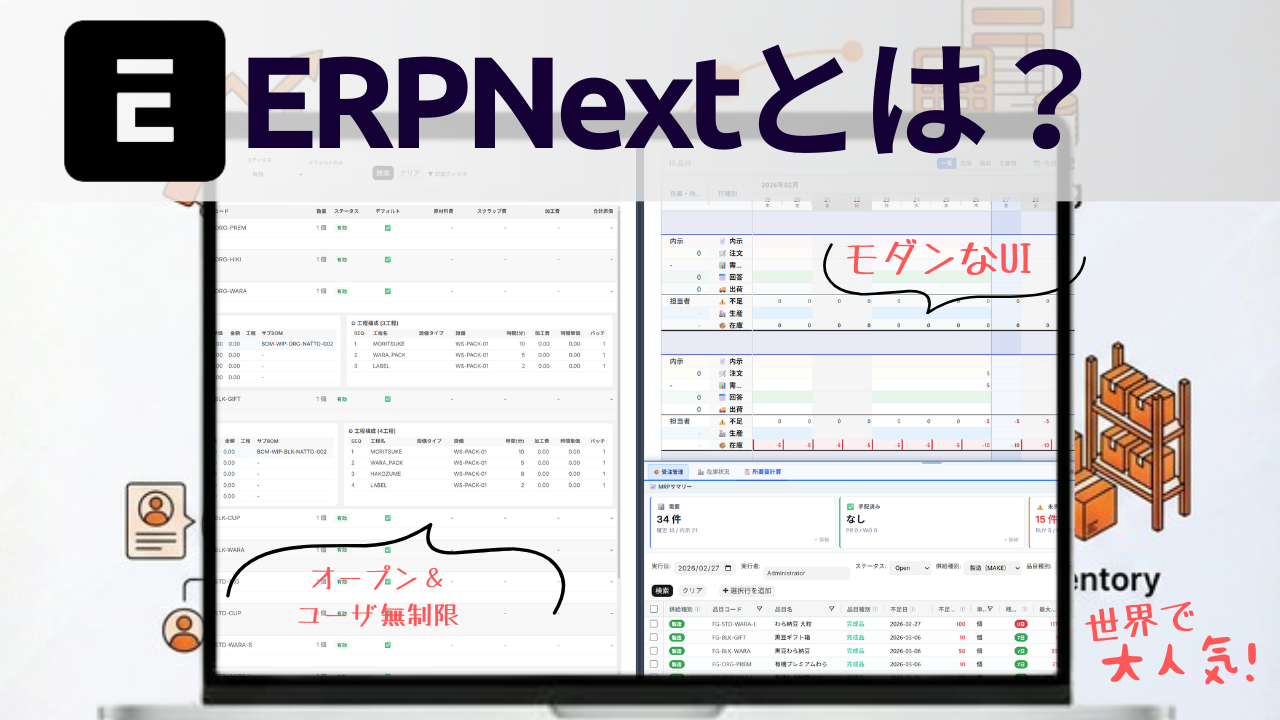
📖 What you'll learn here
- What ERPNext is — an overview of an open-source ERP deployed by 30,000+ companies worldwide
- How real business flows connect from order through invoicing — visualised
- The concrete cost difference versus other ERPs and the lower bar to adopt
- How ERPNext feels in practice and how its Japanese-language support looks
Sound familiar?
"Sales in Excel, inventory on a paper ledger, accounting in another tool —" When information is scattered, a whole day can vanish just to verify things.
- Different systems per department, with double-entry of the same data as a daily routine
- Need to aggregate in Excel every time just to see how the business is doing
- When a key person is out, work stops — excessive reliance on individuals is the norm
- At month end, sales and inventory numbers don't match — half a day of reconciliation every time
It is exactly these SMBs where ERPNext shines.
🌍 What is ERPNext
ERPNext is an open-source integrated business system (ERP) used by everyone from SMBs to large enterprises.
Sales, accounting, inventory, HR, manufacturing — all the major capabilities a business needs, on a single platform.
It rivals commercial ERP in features while being open source so you are free to use and extend it. You keep adoption costs low while staying flexible enough to fit your business.
ERPNext is developed and maintained by Frappe Technologies and is used by 30,000+ companies worldwide.
| Item | Detail |
|---|---|
| Developer | Frappe Technologies (India) |
| License | GPLv3 (open source) |
| Adoption | 30,000+ companies worldwide |
| Languages | Multilingual, including Japanese |
| Tech stack | Python / JavaScript |
| Latest version | v15 (since 2024) |
🖥️ ERPNext in real screens
You may worry: "ERP is business software, surely it has dated, hard-to-use screens?" ERPNext uses a modern web-based UI — operate it from any device with a browser.
Home (Workspace)
This is the workspace you see first after logging in. Per-business shortcuts — sales, manufacturing, purchasing, accounting and so on — are laid out as cards. You can reach order management, work orders, MRP shortage lists and more in one click.
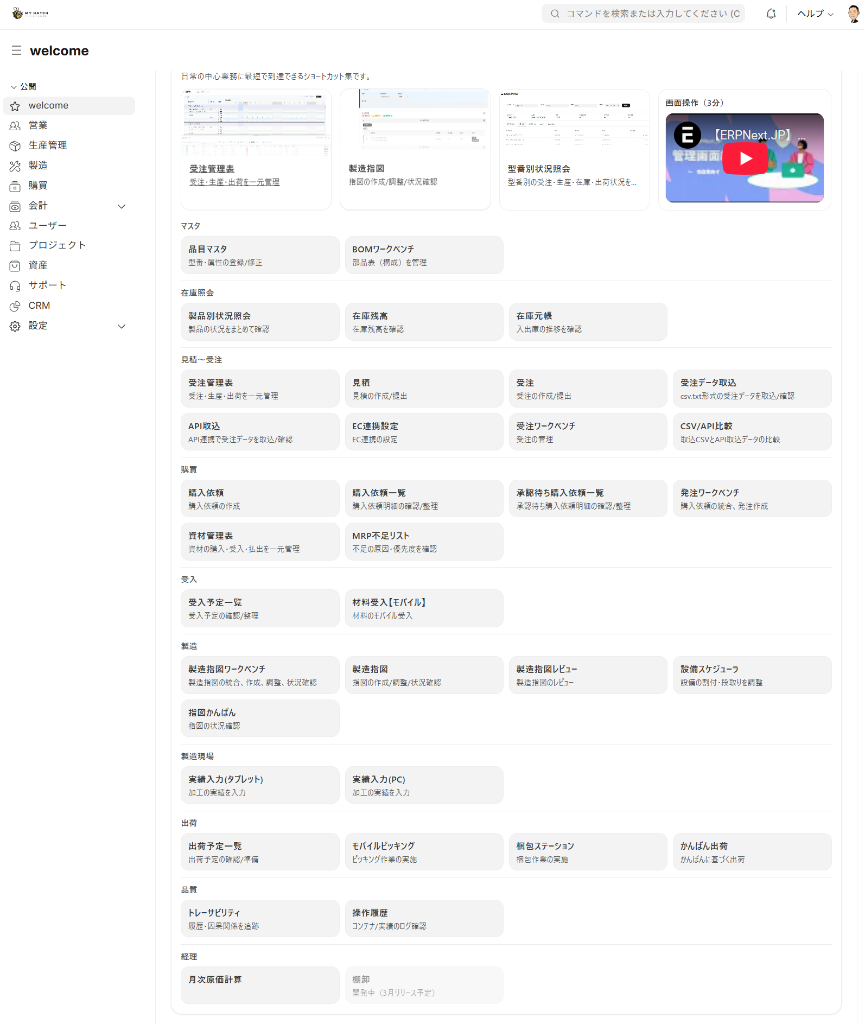
📌 The sidebar module menu gives you direct access to Sales, Manufacturing, Purchasing, Accounting, CRM and more.
Order workbench — from EDI ingest to one-screen control
The Order workbench lets you complete order operations in a single screen. Orders ingested from EDI (electronic data interchange) are listed in real time with item code, quantity, unit price and shipping schedule. Click a line and details appear instantly in a side panel.
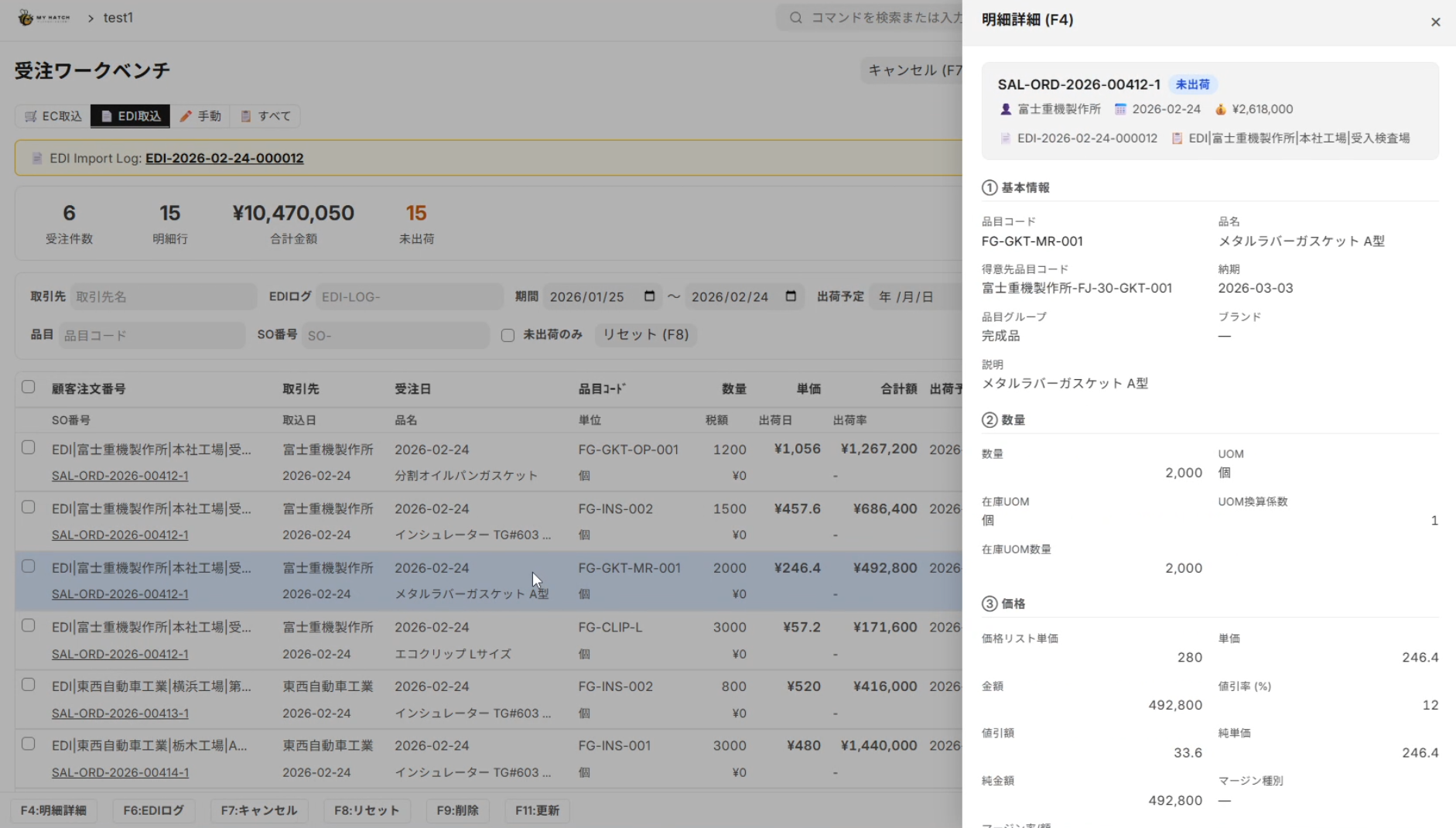
📌 Tabs let you switch across EC ingest / EDI ingest / manual entry / all to manage every channel. The top of the screen summarises order count, total amount and unshipped quantity.
Stock query — Excel-like list view
A demo of the stock query screen — see inventory in real time. Items × warehouses are shown in a matrix layout; filter and sort to reach the data you need quickly.
📌 A table view that staff used to Excel can use intuitively. Reorder columns, filter and search all in one click.
📊 Order-to-invoice business flow
ERPNext's signature characteristic is that data flows in a straight line from order to invoice. With Excel-based management, every step (order → ship → invoice) needs manual entry. In ERPNext, the next document is generated from the previous one automatically.
Customer ─→ 📋 Quotation ─→ 📦 Sales Order ─→ 🚚 Delivery Note ─→ 💰 Sales Invoice ─→ ✅ Payment Entry
Concrete example: food processor "Company A"
- Order arrives by FAX → digitised by OCR and registered automatically as a Sales Order
- Issue manufacturing instructions → Work Orders created automatically from the BOM linked to the order
- Capture production results → entries via barcode scan, lot numbers assigned automatically
- Ship and deliver → creating the Delivery Note deducts inventory automatically
- Issue the invoice → generate the Sales Invoice from the Delivery Note in one click; e-invoice ready
- Reconcile payment → import the Zengin bank CSV and reconcile automatically
In this flow, manual entry only happens when checking FAX orders. After that, data flows inside ERPNext, eliminating typos and missed transfers.
💰 Cost comparison: ERPNext vs commercial ERP
ERP is often perceived as expensive — but ERPNext is within reach for SMBs.
| Comparison | ERPNext.JP | Typical commercial ERP |
|---|---|---|
| Initial cost | Full source handed over (your asset) — verify with a fixed-scope PoC first. Contact us for pricing | ¥1m–¥5m |
| Monthly fee | No monthly license fee (maintenance subscription optional — contact us for pricing) | ¥300,000–¥1,000,000+ |
| Users | Unlimited (zero per-user billing) | Per-user pricing |
| Minimum term | None | 1–3 years |
| Customization | DIY or with a partner — your choice | Vendor-dependent (large extra fees) |
| Updates | Free | Sometimes paid |
Run the numbers for a 30-person manufacturer
| ERPNext.JP | Some other cloud ERP | |
|---|---|---|
| Initial | Full source handed over (own it) — contact us for pricing | Initial ¥2M |
| Annual (running) | No per-user billing (optional maintenance subscription only) | ¥5,000 × 30 users = ¥150k/mo = ¥1.8M |
| Year 4 onward | Optional maintenance only — zero per-user billing | Per-user billing continues |
With ERPNext.JP you own the system and its source code (your asset). The other ERP charges per user, so cost climbs as you add part-time or temporary staff, and keeps running past year 3. ERPNext.JP has zero per-user billing and unlimited users — the gap widens the longer and wider you use it. Contact us for pricing.
🧩 Standard features for manufacturing
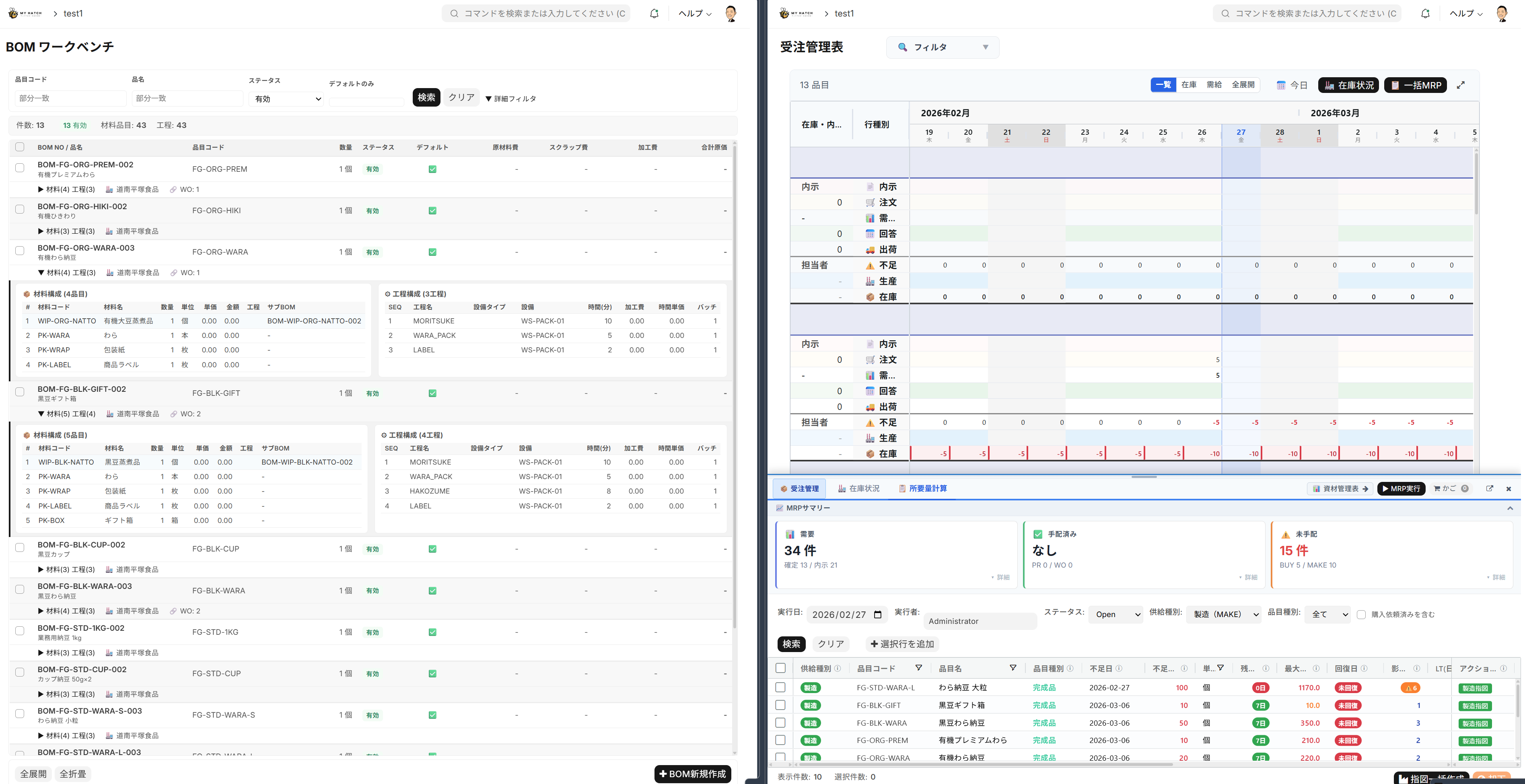
ERPNext ships with 13+ standard modules. It also has rich features tailored to manufacturing and food processing. The screenshot below shows the BOM workbench, the order management table and the MRP summary.
| Module | Main use | When to use it |
|---|---|---|
| Accounting | Journals, closing, consumption tax | Automate monthly close |
| Sales | Quote → Order → Delivery → Invoice | Connect order ops end to end |
| Purchasing | PO → Receive → Pay | Move purchasing off Excel |
| Inventory | Multi-warehouse, lots, stock count | See real-time stock |
| Manufacturing | BOM, Work Order, costing | Compute manufacturing cost accurately |
| MRP | Requirements calculation, shortage lists | Avoid material shortages |
| HR / Payroll | Attendance, leave, payroll | Centralize HR information |
| CRM | Leads, opportunities, customer analytics | Make sales activity visible |
| Project management | Tasks, hours, progress | Manage project profitability |
Tip
You can use only the modules you need, or unify everything across the company. Step-up adoption — "start with sales and inventory, add accounting once you're comfortable" — is also fine.
🇯🇵 ERPNext.JP — Japanese-business support
When using a foreign-built ERP in Japan, the question is "does it match Japanese business practice?" ERPNext.JP supports the following Japanese-business needs as standard:
| Japanese requirement | Status |
|---|---|
| Consumption tax 10% / reduced 8% | ✅ Standard |
| Qualified invoice (Invoice System) | ✅ Compliant invoice format |
| Zengin CSV payment reconciliation | ✅ Bank data ingest |
| Japanese UI | ✅ All screens translated |
| FAX-OCR order ingest | ✅ FAX order digitisation |
| EDI order ingest | ✅ Zengin-EDI and proprietary formats |
| Monthly costing | ✅ Japan-style rolling costing |
Japanese invoice (Invoice System compliant)
Below is an actual invoice produced by ERPNext.JP. The Invoice-System registration number, consumption tax breakdown and totals are output automatically in a format aligned with Japanese business practice.
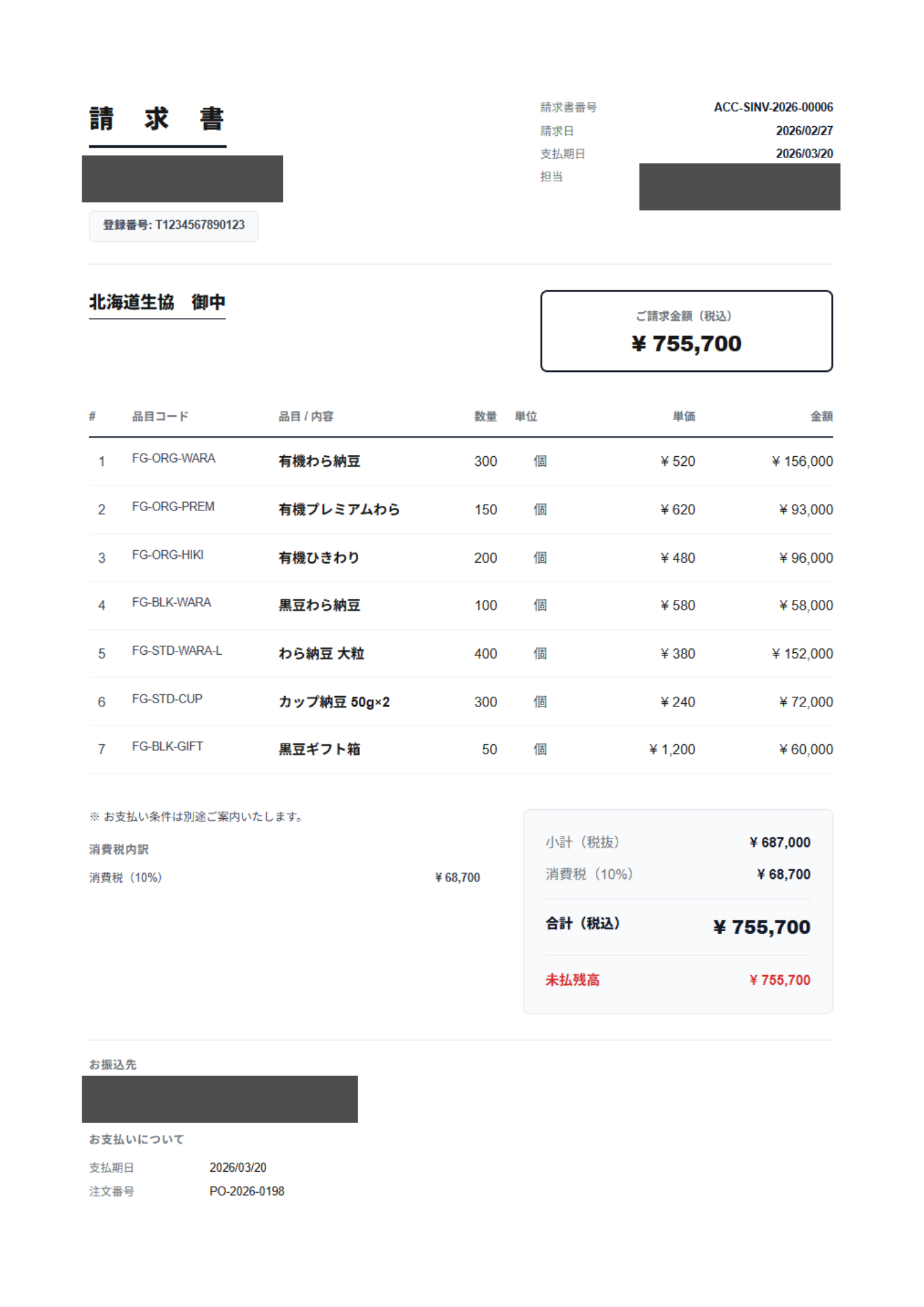
📌 The registration number (e.g. T1234567890123) is printed automatically, so it can be sent to counterparts as a qualified invoice. Payment terms and remittance details are inserted automatically.
🔧 Freedom to customize
ERPNext sits on Frappe Framework, which lets you customize from no-code to full code progressively.
| Level | Method | Who | Examples |
|---|---|---|---|
| No-code | Add fields via the UI | Business users | Add custom fields, change input forms |
| Low-code | Automate via scripts | IT staff | Auto-create Employee on user creation |
| Full-code | Build a Python app | Developers | Custom barcode-scan app |
There is no vendor lock-in: you can evolve the system as your business grows. For details, see Customization that does not break.
🚀 The first three steps
There is nothing special you need to prepare to start with ERPNext.
| Step | What you do | Time |
|---|---|---|
| ① Talk | Free consultation to understand business needs | 30 min |
| ② Try | 14-day free trial on the live system | At your own pace |
| ③ Start | Data migration, initial setup, then go live | About 2–4 weeks |
Begin with the 14-day free trial to confirm how well ERPNext fits your operations. If it doesn't, you can stop any time — there is no minimum term.
📚 Want to learn more
| What you want to know | Recommended read |
|---|---|
| ERP fundamentals | What exactly is ERP? — Difference from accounting software in 5 minutes |
| Use in food processing | From order to delivery, all visible — integrated ERP for food processing |
| Industry fit analysis | Why ERPNext fits food processors and parts makers |
| Customization techniques | Why ERPNext's extension design survives upgrades |
| Comparison vs other ERPs | ERPNext vs Odoo — head-to-head |
| Open-source ERP overview | What is open-source ERP? Comparison of 5 products [2026] |
| Try the demo | Try ERPNext on the demo environment |
Related articles
 5 min
5 minWhat exactly is ERP? — Understand the difference from accounting software in 5 minutes
From the basics of ERP to its market share in Japan and the cost challenges of traditional ERP. We answer the question 'What is ERP, really?' with clear diagrams.
 4 min
4 minHow to start — see the screen in 1 minute
Press the "Try now" button on this site and within 1 minute you'll get a login link to the demo. Three progressive stages — look only, evaluate after a meeting, and your own dedicated environment — let you try ERPNext as deeply as you want.
 9 min
9 minWho is Frappe, the company behind ERPNext? — Founding story and future vision
An introduction to Frappe Technologies, the developer of ERPNext: company profile, flagship services, and the founder's formative experience. Understanding their philosophy of 'democratizing ERP' will change how you evaluate the product.