
The impact of creating a Bill of Materials (BOM) on cost accounting.
This document explains how to create a Bill of Materials (BOM) and its impact on cost accounting. It covers everything from setting up raw materials, processes, and by-products to its relationship with monthly cost accounting.
What you can do on this screen
A Bill of Materials (BOM) is a list that shows "which materials, in what quantities, and at which stage of production" are used to manufacture one unit of a particular product. (In English, this is called the Bill of Materials. Hereafter, we will refer to it as "BOM.")
The Bill of Materials (BOM) directly impacts the following tasks:
- Creating Manufacturing Orders: The necessary materials and processes are automatically generated according to the Bill of Materials (BOM).
- Material Requirements Calculation (MRP): Automatically calculates the required quantities of raw materials by following the Bill of Materials (BOM) step by step.
- Cost Accounting: Used as a basis for calculating material costs, processing costs, and overhead costs.
Administration screen URL:/app/bom-master
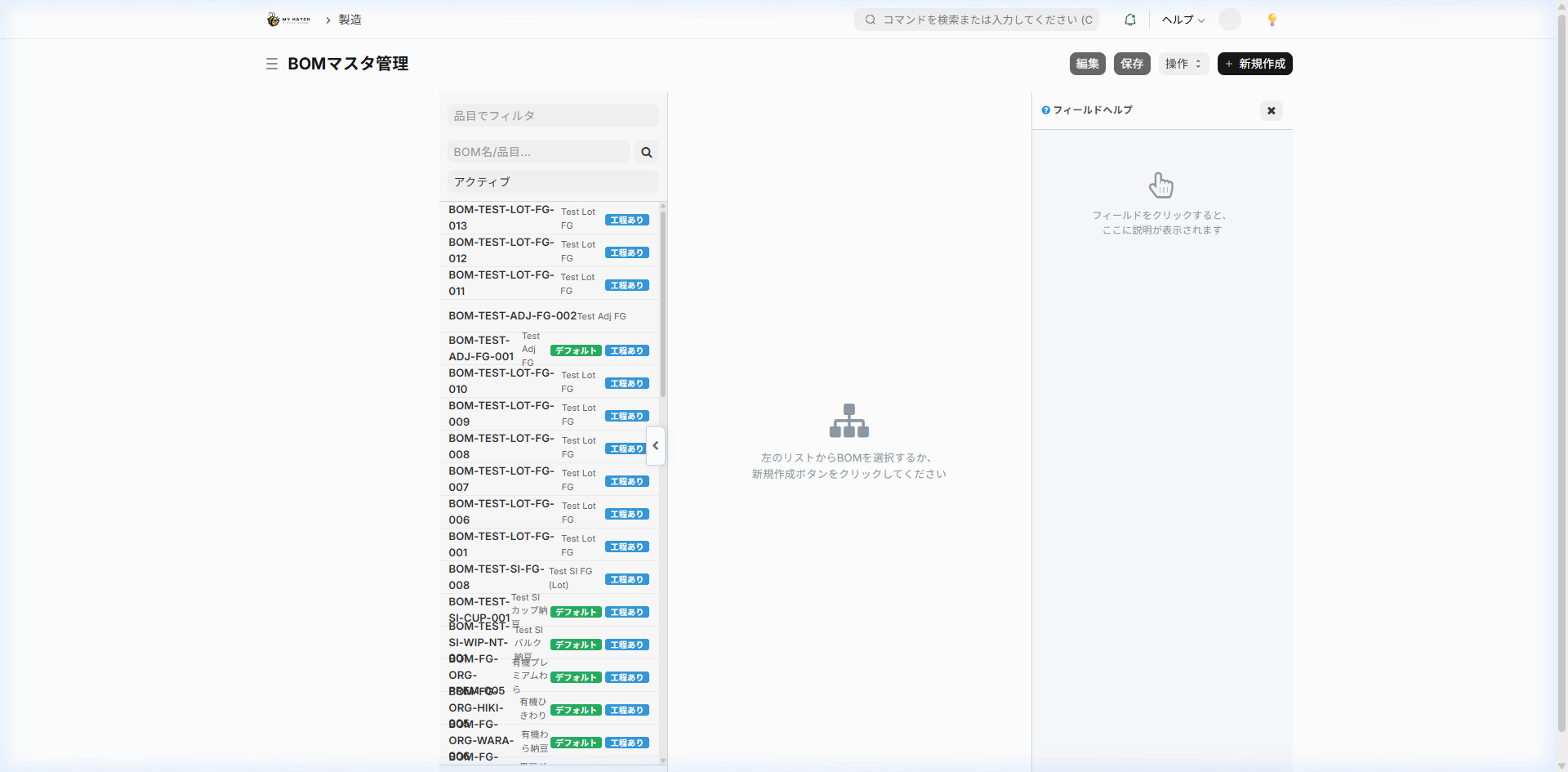
BOM structure
A Bill of Materials (BOM) consists of four main elements.
- Basic Information (Which items and how many units of each item are to be produced in this BOM?)
- List of Ingredients (What ingredients to use and in what quantities)
- Process List (Optional: Which processes to follow)
- List of By-products (By-products and waste generated simultaneously. Optional)
1. Basic information
| Item | Content | Required |
|---|---|---|
| Items | Items to be made with this BOM | ✅ |
| Company | Target Company | ✅ |
| Quantity | How many units are defined in this BOM (usually 1) | ✅ |
| Units | Manufacturing unit (kg, pieces, etc.) | ✅ |
| Enable/Disable | Use or stop using this BOM | - |
| Default BOM | Specify this as the default BOM to use for this item | - |
| Process exists | Do you want to manage the process (work steps)? | - |
| Alternative materials permitted | Do you allow the use of alternative materials? | - |
| Routing | Linking standard process sets (explained below) | - |
| Timing of material consumption | Whether to consume by production order or per process card | - |
| Process Loss Rate (%) | Standard loss rate during manufacturing | - |
2. List of Ingredients
The raw materials that make up the Bill of Materials (BOM) are listed below.
| Item | Contents |
|---|---|
| Item Code | Raw Material Item Code |
| Item Name | Automatic Display |
| Quantity | Amount required per BOM unit |
| Units | Units used (kg, g, etc.) |
| Inventory Unit | Standard Unit for that Item (Automatically Displayed) |
| Unit Price | Automatically retrieved from item price |
| Amount | Quantity × Unit Price |
Example: Natto BOM
| Ingredients | Quantity | Unit | Remarks |
|---|---|---|---|
| Black beans (domestic) | 1.15 | kg | 1.15 kg for every 1 kg of product, taking yield into consideration. |
| Bacillus natto | 0.5 | g | |
| Packaging container (straw) | 1 | piece |
3. Process List
工程ありWhen this is turned ON, you can define the manufacturing process step by step.
| Item | Contents |
|---|---|
| Process Name | Select from Process Master (e.g., immersion, steaming, inoculation) |
| Equipment | Select the workspace/equipment to use |
| Working time (minutes) | Standard working time per task |
| Batch size | Quantity that can be processed in one operation |
| Processing Costs | Processing costs for each step (automatically calculated) |
4. List of By-products
This defines by-products and waste generated during the manufacturing process.
| Item | Contents |
|---|---|
| Item Code | By-product Item Code |
| Quantity | Amount generated per BOM unit |
| Unit price | Unit price of by-products |
BOM Registration Procedure
Register on the custom screen
1./app/bom-master Open
2. Click the "New BOM" button.
3. Select the target item.
4. Add raw materials (enter item code, quantity, and unit)
5. Add steps as needed.
6. Save using the "Save" button.
Register using the standard form
1./app/bom/new Open
2. Enter information in each field.
3. Save → Submit
Key Point: When you submit a BOM, the cost will be calculated automatically. Material costs are the sum of "unit price of each raw material × quantity".
Relationship between BOM and cost accounting
Costs calculated using BOM (standard costs)
The Bill of Materials (BOM) automatically calculates the following three costs. These are "standard costs" and are separate from actual costs calculated in the actual monthly cost accounting.
| Classification | Calculation method |
|---|---|
| Raw Material Costs | Total of (unit price × quantity) of each raw material |
| Processing Costs | Total processing costs for each process |
| Total Cost | Raw Material Costs + Processing Costs |
The role of BOM in monthly cost accounting
Monthly cost accounting (/app/costing-workbench The process involves multiple steps, but the parts where the BOM particularly has an impact are the following three:
① Impact on the calculation of direct material costs
- The composition of raw materials registered in the BOM will be the basis for allocating material costs.
- Allocate the actual cost of materials consumed to each item according to its proportion in the Bill of Materials (BOM).
- Changing the quantities in the Bill of Materials (BOM) will alter the allocation ratio and affect the cost.
② Impact on the calculation of direct labor costs
- The calculation is based on the processes set in the BOM and the hourly rates of the equipment used in those processes.
- Actual working hours are obtained from performance data recorded on-site.
- Adding or removing processes will affect the calculation of labor costs.
③ Indirectly affects the allocation of indirect costs
- The allocation ratio for indirect costs (utilities, administrative costs, etc.) is determined according to actual working hours and production volume.
- The process configuration of the BOM indirectly influences the allocation through its historical data.
Cost confirmation screen
The results of the monthly cost calculation can be viewed on the next screen.
| Screen | URL | Contents |
|---|---|---|
| Material Consumption Flow | /app/costing-fifo-flow | Trends in material consumption order and unit price under first-in, first-out (FIFO) system |
| Work-in-Progress Inventory Summary | /app/costing-wip-summary | Work-in-Process Costs by Process and Item |
| Price Difference Review | /app/costing-variance-review Discrepancy between standard cost and actual cost | |
| Month-on-Month Review | Same as above (Month-on-Month tab) | Cost comparison with the previous month |
| Allocation Preview | /app/costing-allocation-preview | Indirect Cost Allocation Simulation |
| Verification | /app/costing-validation-summary | Checking the consistency of cost accounting |
Rules for using BOM
Default BOM
- You can set only one "default BOM" for each item.
- When creating a production order, a default BOM is automatically selected.
- The default BOM is used for requirements calculation as well.
When changing the BOM
- If you want to change the BOM, it is recommended to create a new BOM and override the old one.
- Do not change the BOM during the period in which monthly cost accounting is being performed (this may disrupt cost consistency).
Multilayer component configuration
A BOM can be expanded into a tree structure up to 5 levels.
完成品 BOM
  └─ 仕掛品A(BOMあり → さらに展開)
       └─ 原材料X
       └─ 原材料Y
  └─ 包装資材B(BOMなし → 末端の材料)
The requirements calculation automatically calculates the necessary quantities by traversing this entire hierarchy to reach the final raw material.
Tips for Use
- Reflect raw material price updates in the BOM: After changing item prices, you can update the latest unit prices using the "Update Costs" button in the BOM.
- Setting the process loss rate: Setting the loss rate will automatically adjust the planned quantity to reflect the yield.
- Utilizing Routing: When using the same process configuration for multiple items, registering it as a process set (routing) makes management easier, as you only need to select one when creating the BOM.