
Estimate creation (process-based cost model)
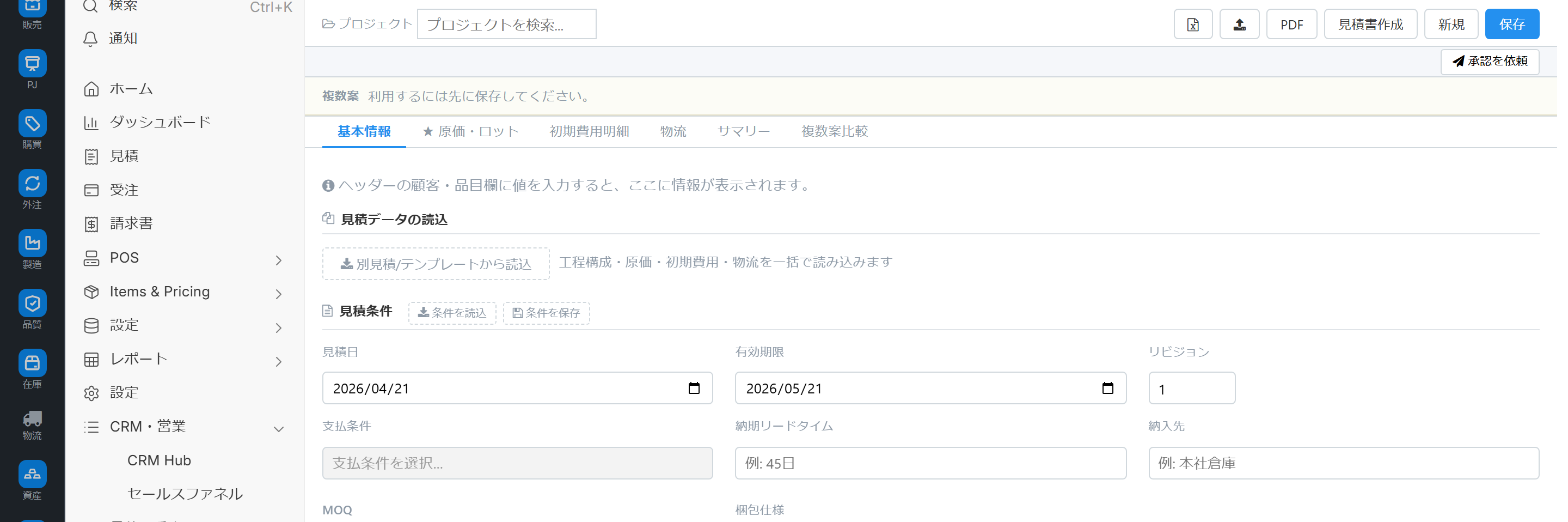
This estimation screen, which aggregates costs for each process, is composed of six tabs: Basic Information, Cost & Lot Size, Initial Costs, Logistics, Summary, and Multiple Option Comparison. We will explain everything from the process x cost element matrix, template application, multiple option comparison, and transfer to the estimate.
Related Articles The structure table (section hierarchy) type is Estimate creation (structure table format) For smartphones, please refer to the mobile quote. The generated quotations are managed using a common quotation screen.
What you can do on this screen
The Estimate Creation (Process-Based Costing) screen is for creating estimates by accumulating costs for each process. It consists of 6 tabs, where you input material costs, processing costs, and subcontracting costs for each process into a process × cost element matrix, and then transfer the data to a standard estimate after completion.
- Detailedly build up costs for each process.
- Manage initial costs (NRE), such as mold and jig costs, with detailed breakdowns.
- Shipping and packaging costs will be accounted for separately from the product price.
- Compare multiple cost scenarios in parallel for the same supplier.
- Quickly create cost templates for recurring projects.
Screen URL:/app/quotation-matrix-view
How to use it with other quotation screens
| Screen | Structure | Application |
|---|---|---|
| Estimate creation (structure table format) | Section Hierarchy | Standard Product Combinations/Breakdown |
| Process-Based Cost Model (This Article) | 6 Tabs + Cost Matrix | Custom Products/Outsourced Processing |
| Mobile Quote | Smartphone Screen | Instant Quote on the Go |
6 Tab Configuration
| # | Tab | Content |
|---|---|---|
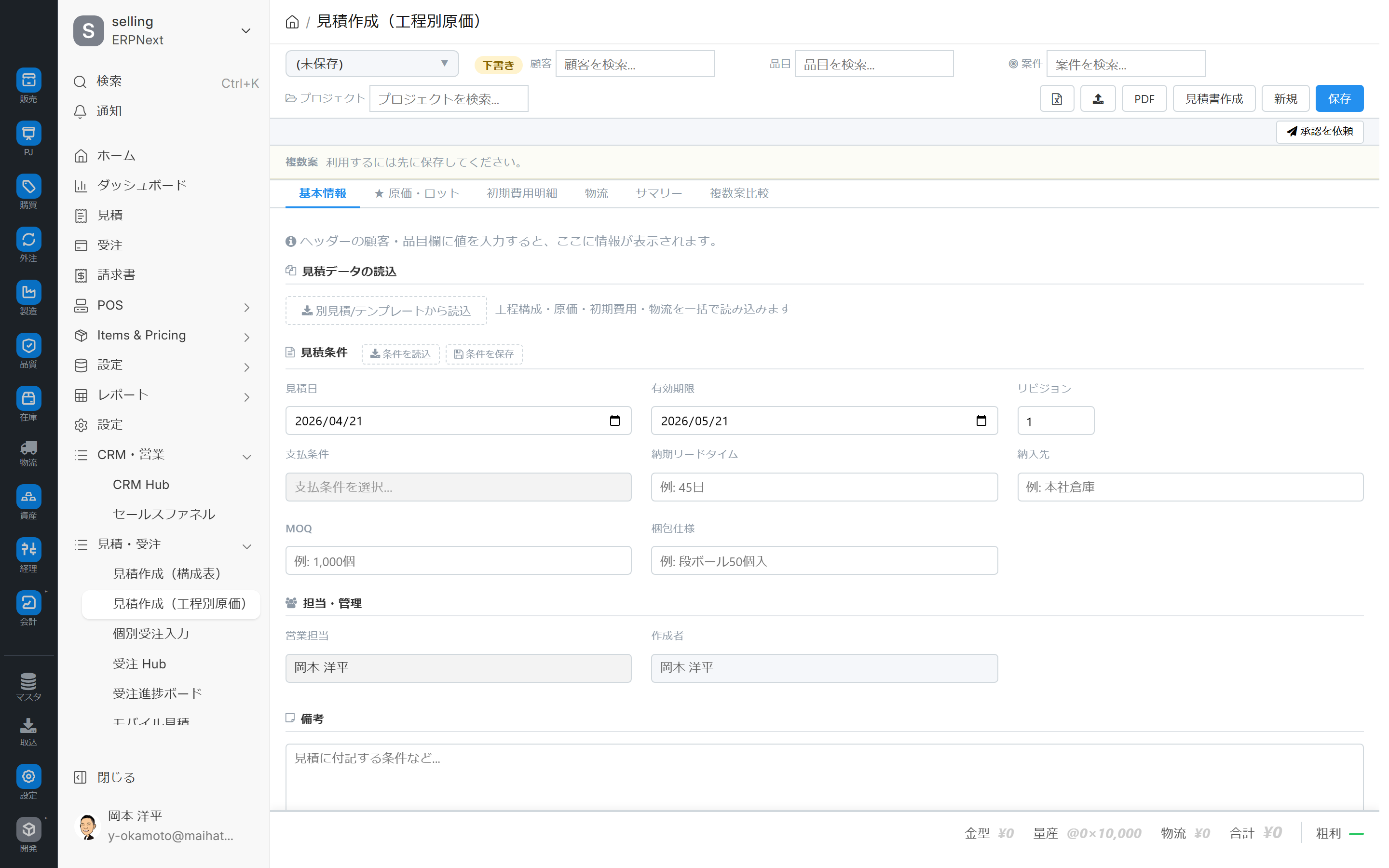
| 1 | Basic Information | Customer / Item / Inquiry Link / Status |
| 2 | Cost/Lot Size | ★Main Tab. Process × Cost Element Matrix |
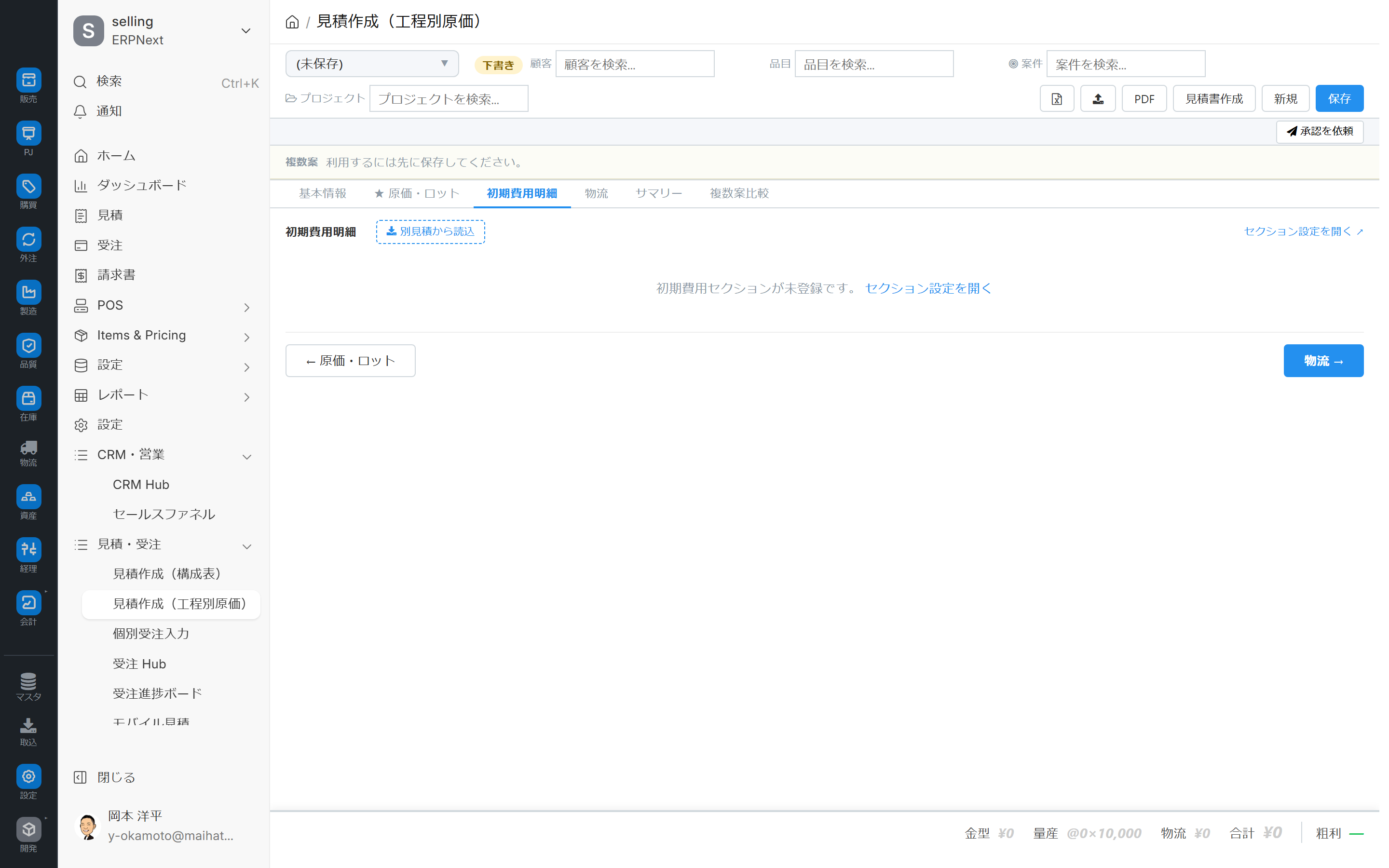
| 3 | Initial Costs | Initial costs (NRE) such as mold costs, jig costs, and prototype costs |
| 4 | Logistics | Shipping and Packaging Fees |
| 5 | Summary | Aggregated results (total cost, margin rate, desired selling price) |
| 6 | Comparison of Multiple Options | Parallel Comparison of Multiple Scenarios |
Header
- Cost matrix number (selectable with selection tool)
- Status Badge: Draft / Approved / Transcribed / Pending
- Header fields for customer and item (directly editable)
Cost Tab: Process x Cost Element Matrix
In the process (rows) × cost element (columns) matrix, enter material costs, processing costs, and outsourcing costs for each process.
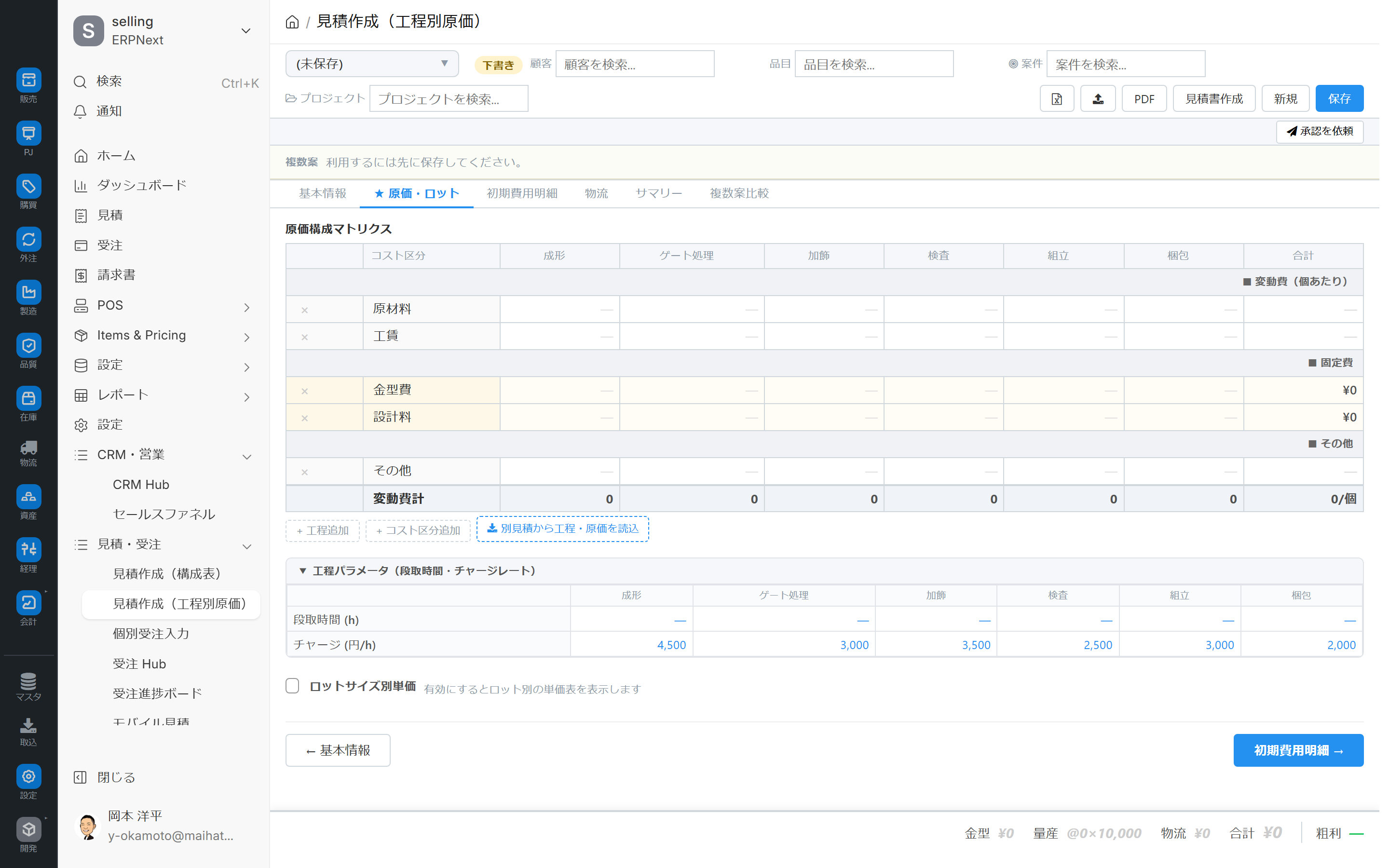
Row (process)
This refers to a group of processes defined in the cost template, or a process configuration where data is entered in bulk using the cost template. It is intended to be linked to the process procedure (routing).
Column (Cost Element)
The following are some of the typical items (customizable):
- Material cost
- Processing cost
- Outsourcing costs
- Personnel costs
- indirect costs
Apply template
For recurring projects, you can input the process structure in bulk using a cost template.
- Click the "Select Template" button.
- Select a cost template (pre-register by industry and customer).
- A template for process × cost elements is introduced.
- Overwrite with project-specific values.
Initial Costs (NRE) Tab
We manage the one-time costs incurred at the start of manufacturing in detail.
| Example Expenses | Explanation |
|---|---|
| Mold Costs | Cost of manufacturing new molds |
| Jig Costs | Cost of manufacturing dedicated jigs and fixtures |
| Prototype Costs | Cost of producing prototypes |
| Initial Setup Fee | Initial setup of the manufacturing line |
NRE (Initial Costs) refers to non-recurring engineering costs that occur only once at the start of manufacturing.
You can specify the proportional allocation rule for initial costs (e.g., pro-rata allocation for all lots, lump-sum payment, or phased amortization).
Logistics Tab
Transportation and packaging costs will be accounted for separately from the main product estimate.
| Item | Contents |
|---|---|
| Transportation methods | Trucks / Containers / Air freight, etc. |
| Unit Price | Cost per Use |
| Quantity | Number of flights |
Because it can be output as a separate line when transferring it to a quotation, it becomes easier to clearly show customers the breakdown of logistics costs.
Summary Tab
This is a summary calculated from the inputs across all tabs.
- Total Cost = Total Process Costs + Initial Costs + Logistics
- Margin Rate = Desired Profit Margin
- Desired selling price = Total cost × (1 + margin rate)
Multiple Options Comparison Tab
We will compare multiple cost scenarios for the same supplier and the same item in parallel.
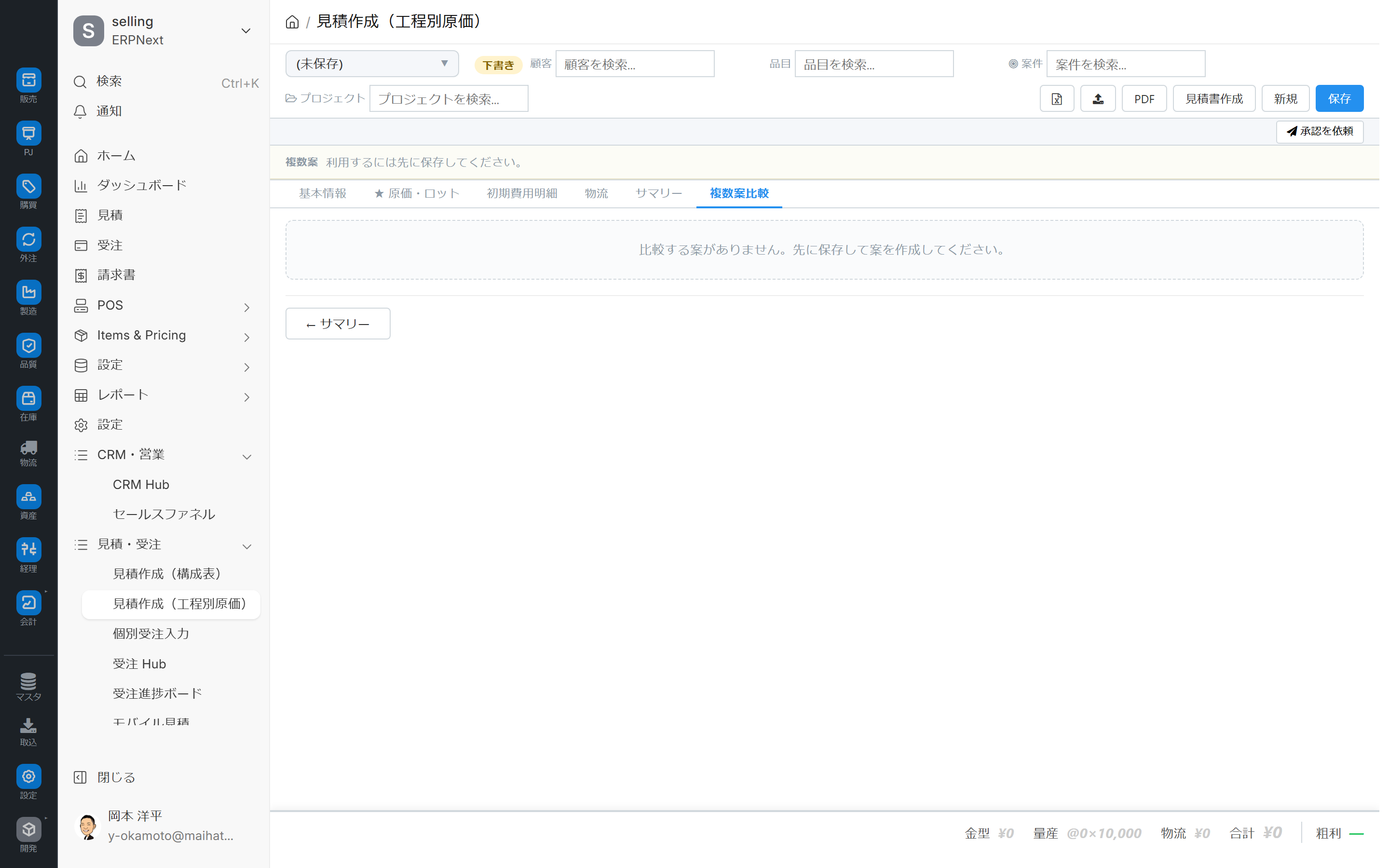
- Option A: Domestic production
- Option B: Overseas production + import
- Plan C: In-house production + partial outsourcing
This approach is suitable for structuring proposals by comparing scenarios like the one described above.
Operating Procedure
1. Create a new entry
1.Ctrl+K Select "Create Estimate (Process-Based Costing)".
2. Or transition from inquiry (to URL?opportunity=XXX (Automatically filled in)
3. Specify the customer, item, and project in the Basic Information tab.
4. Save as draft.
2. Apply the template and start the process
- Open the Cost tab.
- Select the cost template under "Apply Template".
- The template is entered into a matrix of process × cost elements.
- Overwrite with project-specific values.
3. Additional initial costs/logistics
- Register the costs of molds, jigs, etc. in the Initial Costs tab.
- Enter the transportation method, unit price, and number of trips in the Logistics tab.
- Check the total in the Summary tab.
4. Parallel comparison of multiple options
- Open the Multiple Options Comparison tab.
- Copy Plan A using "Add New Plan" → Change some values → Save as Plan B
- Compare total cost, margin rate, delivery time, etc. using parallel display.
- Decide on the adopted plan.
5. Transfer to the quotation
- Change the status from Draft to Approved.
- Click the "Create Quotation" button.
- A standard quotation is automatically generated, detailing the cost, initial expenses, and logistics.
- The ID of the destination quotation will be recorded.
- From here on, print, PDF, and convert to order form using the standard quotation form.
Note: An error will occur if you run "Create Estimate" again on a cost matrix that already has an estimate linked to it. If you want to overwrite it, please specify the Force Option.
6. Switching the existing matrix
You can switch to a different matrix using the selection tool on the left of the header. You can narrow down your search by customer name, item, and status.
Caution: Switching from the selection tool may result in the loss of any unsaved changes.Ctrl+S Make it a habit to explicitly save your files.
Status and Workflow
| State | Meaning |
|---|---|
| Draft | Editing in progress |
| Approved | Approved, awaiting quotation preparation |
| Transcribed | Transcribed into quotation |
| On Hold | Awaiting Approval |
Linked screens
| Linked to | Role |
|---|---|
| Estimate creation (structure table format) | Edit the same quotation in a hierarchical format |
| CRM Control Tower Estimate tab | List of estimates |
| Inquiry | Upstream process: linking projects and pre-entering URLs |
| Cost Template | Repetitive Template |
Permissions and Roles
| Role | Permissions |
|---|---|
| System Administrator | ✅ |
| Sales Representative | ✅ |
| Sales Manager | ✅ |
| Demo Viewer/Demo Operator | ✅ |
Required settings beforehand
Required
- Pre-registration for Cost Template
- Template category / Process structure definition
- Item Master (Target Items)
- Process/Workplace (Unit cost of process)
Recommended
- Inquiry Master (Inherited from previous projects)
- Approval workflow type
Points to note regarding operation
- Exclusive control for reposting: An error occurs if you re-execute with a matrix that already has a quote linked to it. Resending is possible with the Force option.
- Editing is not possible after transcription (estimated)
- Unsaved changes may be discarded when switching selection tools. →
Ctrl+SMake explicit saving a habit - Relationship with the bill of contents type: The same quotation can be accessed from both screens. When accessed via this screen, the cost matrix comes first, followed by the quotation.
Tips for Use
- Enhance your templates: For recurring business models, registering 5-10 cost templates categorized by industry will significantly reduce time.
- Initial costs and logistics are separated: This allows for transparent negotiations as the cost structure can be clearly shown to the customer.
- Increase your chances of success by comparing multiple options: Present not only price differences but also differences in delivery time and quality side by side.
- Status Management Rules: Ensure consistent definitions of Draft, Approved, and Transmitted within the team.
- Regular review of process cost unit prices: The hourly cost of the process is compared annually with actual results.
FAQ
Q: Which should I use, a bill of materials type or a cost breakdown type?
- The main component is the component configuration → Estimate creation (structure table format)
- Primarily process and cost accumulation → Process-based cost model (this screen)
Since they are saved as the same quotation, you can switch between screens and use them together for a single project. However, please note that if you use this screen, the cost matrix will be created first.
Q: Where do you manage cost templates?
Cost templates are managed on a list screen (search using the search bar). Templates are registered by industry and customer.
Q: What are the rules for allocating initial costs?
While it varies depending on the implementation, there are typically three patterns: "pro-rata allocation across all lots," "lump-sum payment," and "staged depreciation." The choice depends on the specific project.
Q: If I change the matrix after transferring the data to the quotation, will the quotation be automatically updated?
No, the posted quotes are editable independently. If you want to reflect the matrix changes, please repost them using the force option.
Q: Is it unusable without a process procedure master?
If the cost template includes process information, it will work even without a process procedure master. However, linking it to the hourly rate of each process is useful, so we recommend setting it up.
Next Steps
- Create a breakdown of the assembled product using a bill of contents format. Estimate creation (structure table format)
- Converting from estimate to order → CRM Control Tower Order conversion tab
- Overall picture of sales operations → Sales workflow